VerseIsland
FeedLearnLeaderboardGuidesReferenceExploreSearchDocsVerse Library
Sign in
Feed Learn 📖 Codex Leaderboard Guides Reference Explore Search Docs Verse Library
Browse Fortnite›Devices·Up to Fortnite · Devices·48 of 1369 in Devices

Renaming Devices in Unreal Editor

If you're using multiple devices on an island, it can be helpful to give each one a unique, context-specific name. For example, if you have multiple Creature Placers on your island, you might want to name each one based on the creature type, or if you have multiple copies of the same vehicle, you could rename each vehicle spawner based on the vehicle color or associated channel, or use some other way that distinguishes one vehicle from another.

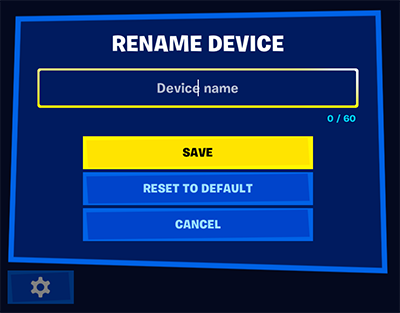
  1. Open the Customize panel and click the Settings (gear) icon on the bottom left of the panel.
  2. Click Rename, and type the new device name. You can use up to 60 characters.
  3. Click Save.

Once you've saved, the new name will appear at the top of the Customize panel. It will also show up when you point at the device with your phone while in Create mode.

Guided course

Add this to your free study plan — we’ll suggest related material and stitch it into one compile-checked lesson.

Keep exploring
More in Devices · 48 of 1369
Prev
prop manipulator device design examples in fortnite
Next
skilled interaction device design examples
Browse all files in this folder (A–Z)

Source

Epic Games documentation

View original

Last updated 2026-02-11T09:35:56.062718+00:00

VerseIsland· an archipelago of Verse & UEFN knowledge
🗺️ Island atlasLearnGuidesHistoryAbout & PressSources & LicensingPrivacy PolicyTermsStatus

Not affiliated with Epic Games. Fortnite, UEFN, Unreal Engine, and Verse are trademarks of Epic Games, Inc. Content is attributed to its source — see Sources & Licensing.

🦜

Scout · your island guide

The Isle of Verse