
Upgrading Legacy Lighting in Multi-Level Projects
With the deprecation of the old time of day manager’s (TODM) day and night cycle and the Skydome device, it is recommended to convert all islands you wish to preserve to the new TODM. All islands using the Skydome device will retain their gameplay, volume data, and positional data, but the island lighting will default to Chapter 5 lighting and ignore any settings used with the Skydome device.
The upgrade guarantees:
- More realistic lighting with Lumen and Nanite.
- Parity with the UEFN TODM and future TODM updates.
This also affects UEFN projects that use multi-level instances, or multiple maps. To ensure that you can publish your island and reduce the possibility of running into problems, you need to convert all lighting in your additional levels.
Default Level
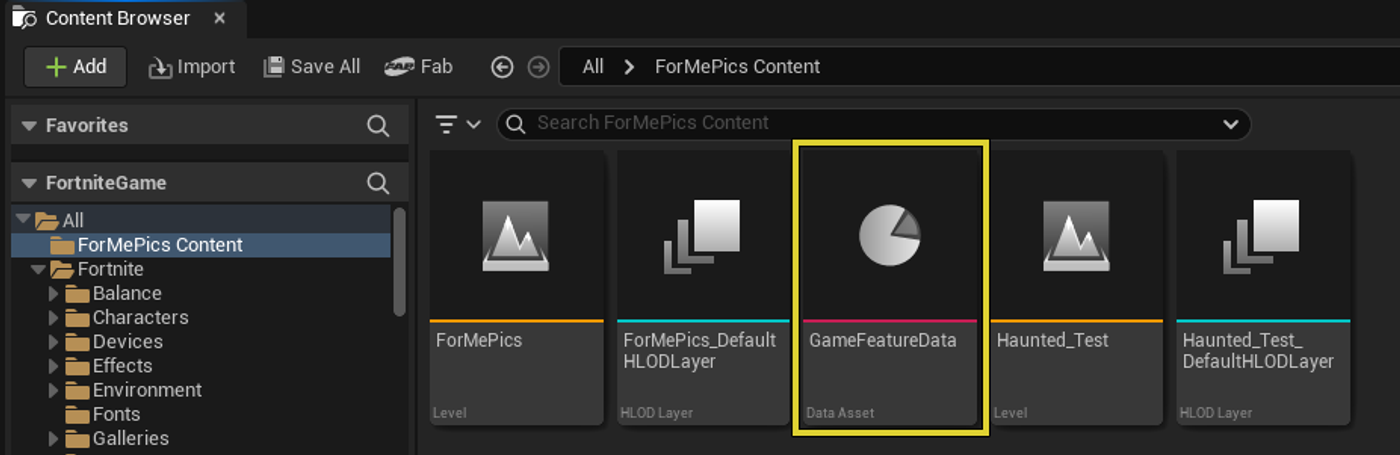
You will always have a default level, which is what is loaded when you launch a session. You can change which level is the default level at any time through the GameFeatureData asset by doing the following:
-
From the Content Browser, double-click the Game Feature Data thumbnail. The Game Feature Data opens in a new window.
You're reading a preview
The full reference is free for BrainDeadGuild Discord members — sign in to read it all, or open the original at the source.
Sign in with your BrainDead.TV / BrainDeadGuild Discord account for full access.