
Using Patchwork Drum Sequencer Devices in Fortnite Creative
The Drum Sequencer (D-SEQR) device lets you place notes on a grid to create a looping pattern. You can create a sequence of up to five different notes per step, or choose from preset drum patterns.
Connect this sequencer to an audio generator device like the Patchwork Drum Sequencer then into a speaker device to hear the results. It is the start of a device chain that results in audio output.
Device Options
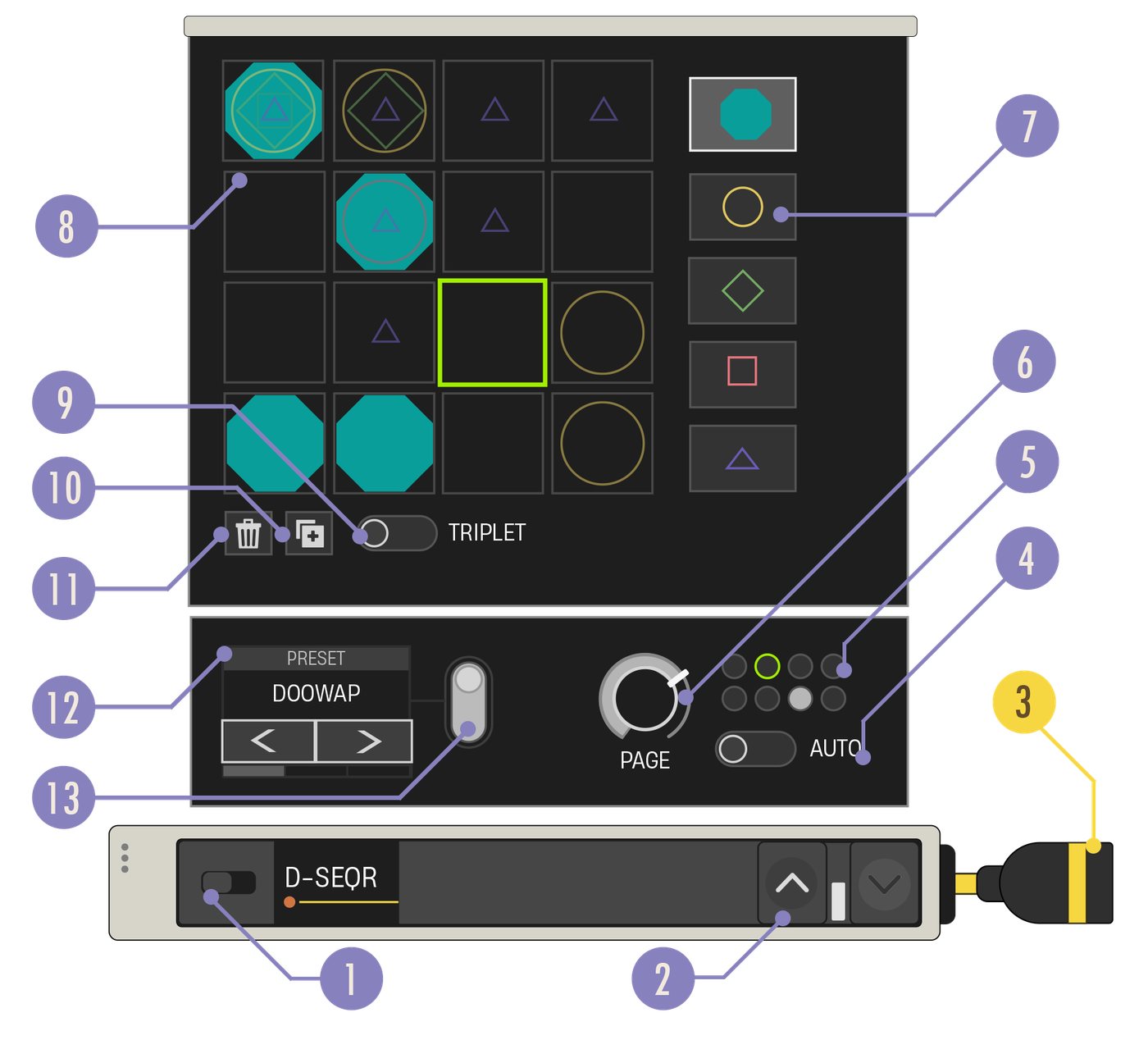
| Option | Values | Description |
|---|---|---|
| 1. Enabled Switch | On, Off | When disabled, the device does not output audio data. |
| 2. Expand Buttons | Closed, Open | Expand the device to reveal more customization options. |
| 3. Note Out Cable | N/A | Connect the Note Out cable to a yellow Note In port. |
| 4. Auto Page | On, Off | Toggles whether output should loop through all pages or current page only. Whenever Auto-Page is turned on, the sequencer will be synced with the global timeline as if they both started at the same time. When you make changes to the Sequencer that would put them out of sync, Auto-Page will automatically turn off. Turn Auto-Page on again to restore the sync. |
| 5. Page Status Display | N/A | The filled circle shows which pages have content, and the green outline shows the page currently played. |
| 6. Page Knob | 1 - 8 | Select which page is played and displayed on the grid. Each page can contain its own pattern of notes. |
| 7. Note Shape Buttons | Shapes | Press a button to choose which note you want when placing notes into the grid. |
| 8. Note Grid | N/A | A grid of squares where each square represents a single step of the device output. Selecting a square in the grid will toggle the selected note shape in that square. Clicking and dragging over the grid places or removes multiple notes of the selected shape. The grid layout will change to reflect your Triplet Timing setting and the current time signature set on the Patchwork Music Manager. |
| 9. Triplet Timing Toggle | Off, On | Selects the rate of the sequencer output. When this toggle is off, the sequencer will output notes at a 1/16 note rate. When on, the sequencer will output notes in a shuffle feel at a 1/8 note triplet rate. The toggle is disabled when the time signature is not 4/4. |
| 10. Duplicate Page | N/A | Copies current grid contents onto the next available blank page. If no pages are blank, this button is disabled. |
| 11. Clear | N/A | Remove all notes from the grid on the current page. |
| 12. Presets Carousel | Techno, Reggaeton, Soca, Bossa Nova, Neo Soul, Big Beat, Miami Bass. Default: Random | Choose from a small selection of common beat patterns to auto-populate the sequencer grid. If you edit the grid, the Preset toggle switches to Off. |
| 13. Presets Toggle | Off, On | While off, the Presets Carousel can still cycled without affecting the grid. When the Preset toggle is switched back on, the selected Preset content replaces the current grid. Using the Page Knob to change to a blank page will also toggle the Preset off. |
You're reading a preview
The full reference is free for BrainDeadGuild Discord members — sign in to read it all, or open the original at the source.
Sign in with your BrainDead.TV / BrainDeadGuild Discord account for full access.