
Using Patchwork Note Sequencer Devices in Fortnite Creative
The Note Sequencer (N-SEQR) is a device that you can use to place notes on a grid to create a looping pattern. It is an easy way to start the device chain that results in audio.
You can specify the notes that you want to hear, or randomize the note grid before connecting this sequencer to an audio generator device and then into an output device to hear the result.
Device Options
All of the settings that can be manipulated with the Patchwork Tool can also be adjusted using the Customize panel in Create mode, or using the Details panel in UEFN.
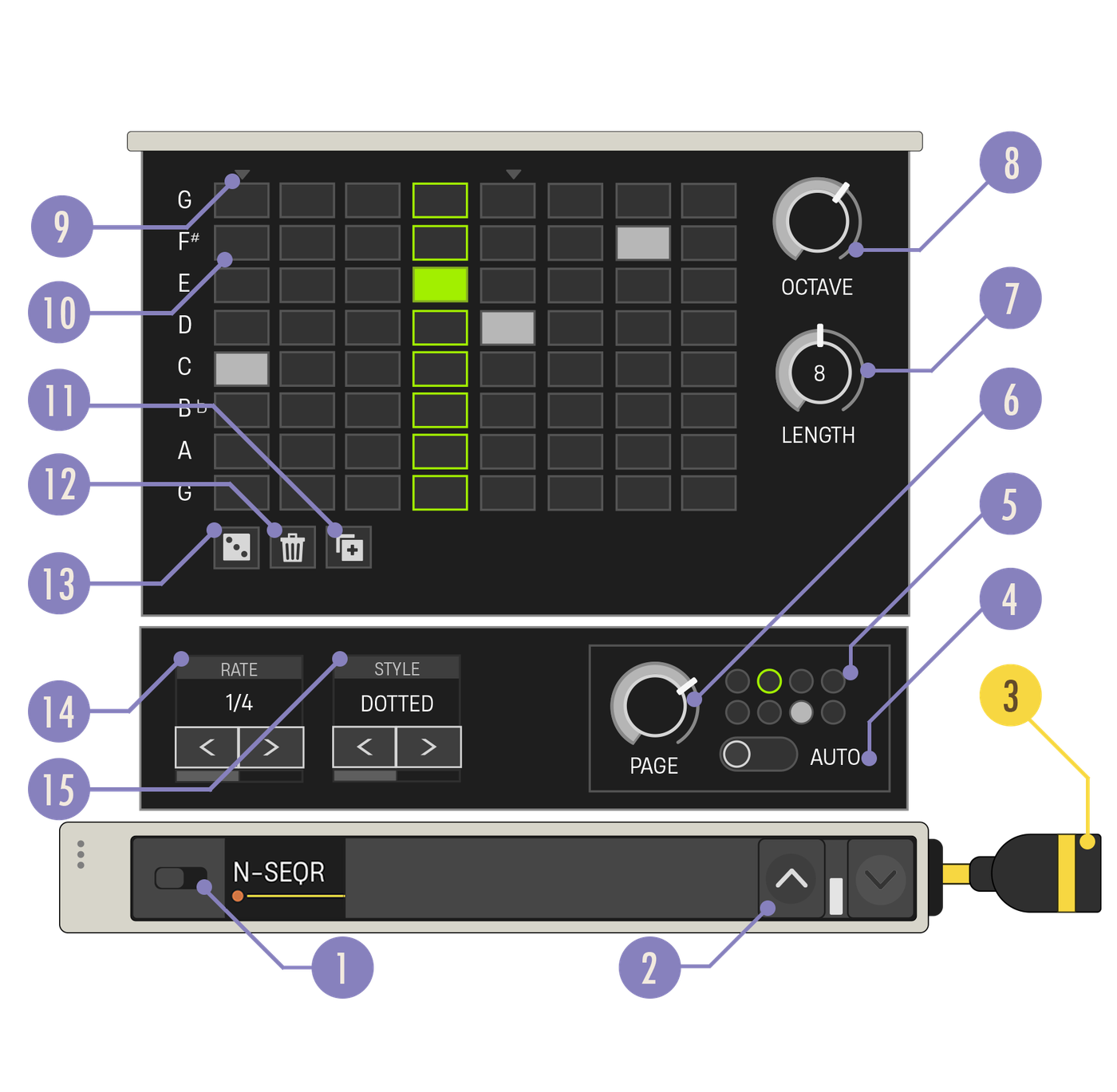
| Option | Values | Description |
|---|---|---|
| 1. Enabled Switch | On, Off | When Disabled, no note data is generated. |
| 2. Expand Buttons | Closed, Open | Expand the device to reveal more customization options. |
| 3. Note Out Cable | N/A | The Note Out cable needs to be connected to a yellow Note In port. |
| 4. Auto Page | On, Off | Toggles whether the sequencer cycles through every populated page, or remains on the current page only. Whenever Auto-Page is turned on, the sequencer will be synced with the global timeline as if they both started at the same time. When you make changes to the Sequencer that would put them out of sync, Auto-Page will automatically turn off. Turn Auto-Page on again to restore the sync. |
| 5. Page Status Display | N/A | The filled circle shows which pages have content, and the green outline shows the page currently being played. |
| 6. Page Knob | 1 - 8 | Select which page is played and displayed on the Note Grid. Each page can contain its own pattern of notes. |
| 7. Length Knob | 1 - 16 | Number of steps per page in the sequence. |
| 8. Octave Knob | 0 - 6 | Sets the octave for all the notes in the sequence. |
| 9. Downbeat Indicator | N/A | Shows the first beat in every measure. They change position if Triplet style is selected. |
| 10. Note Grid | N/A | Area where the users make their note selections. For more details, see Note Grid. |
| 11. Duplicate Page | N/A | Copies current grid contents onto the next available blank page. If no pages are blank, this button is disabled. |
| 12. Clear | N/A | Remove all notes from the grid on the current page. |
| 13. Random | N/A | Places notes randomly on the current page. It can help you overcome writer’s block and get inspired! Note that Random will replace all grid content with a new random pattern. |
| 14. Rate Carousel | Whole Note, 1/2 Note, 1/4 Note, 1/8 Note, 1/16 Note, 1/32 Note, 1/64 Note | Sets the speed at which the Note Sequencer moves through steps. |
| 15. Style Carousel | Straight, Triplet, Dotted | Sets the timing modifier for the selected rate. Straight will divide the pulse by halves, Triplet will divide the pulse by thirds, and Dotted will create a more syncopated feel. This can change where the downbeat indicator appears above the grid. |
You're reading a preview
The full reference is free for BrainDeadGuild Discord members — sign in to read it all, or open the original at the source.
Sign in with your BrainDead.TV / BrainDeadGuild Discord account for full access.