VerseIsland
Feed Learn Leaderboard Guides Reference Explore Search Docs Verse Library
Sign in
Feed Learn 📖 Codex Leaderboard Guides Reference Explore Search Docs Verse Library
UEFN › Building & Props · Up to UEFN · Building & Props · 40 of 71 in Building & Props
Browse UEFN

Build the Level

2. Build the Level

To make the game setup simpler, divide the box fight arena into two floors: a main floor where players will spawn and a basement for staging devices.

To make the game setup simpler, divide the box fight arena into two floors: a main floor where players will spawn and a basement for staging devices.

  1. In the Content Browser, navigate to Fortnite > Props > Haunted and pick a floor tile for your basement.

  2. Drag the tile onto your level and copy it by holding the Alt key and translating it over to the next two cells. To select multiple tiles, hold Shift or Ctrl, then left-click all three floor tiles and copy them over to the adjacent cells. The example level is 3 tiles wide and 5 tiles long.
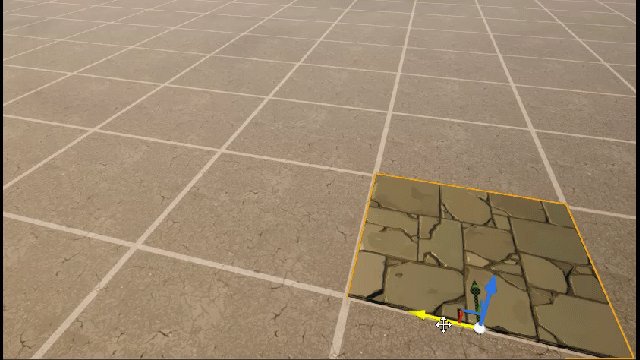
    floor tile

  3. Pick a wall tile and place the wall around the floor you just set down.
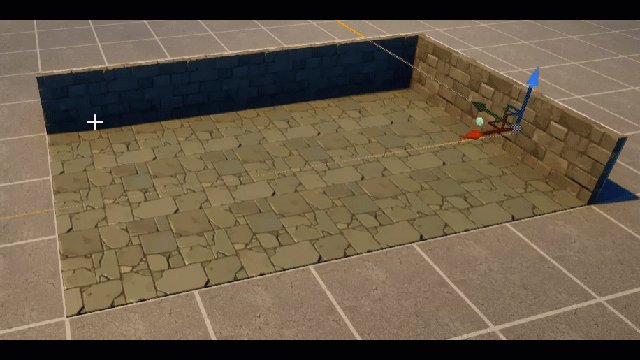
    wall tiles

  4. Repeat the process for the main floor. If you like, add some variety by picking different building Actors. Note that the basement needs a height of 1 tile, while the main floor should be at least 2 tiles high. Here is a view of the arena from the outside.

You're reading a preview

The full reference is free for BrainDeadGuild Discord members — sign in to read it all, or open the original at the source.

Sign in with Discord — free for members Read the original at Epic Games

Sign in with your BrainDead.TV / BrainDeadGuild Discord account for full access.

Comments

    Sign in to vote, comment, or suggest an edit. Sign in
    📄
    Source
    Epic Games

    © Epic Games. Official Epic developer documentation, shown here as a reference with a link to the original. All rights remain with Epic Games. Terms ↗

    View original Sources & licensing
    Request removal
    Last updated Dec 5, 2024
    Keep exploring
    More in Building & Props · 40 of 71
    Prev
    architectural modeling guidelines in unreal editor for fortnite
    Next
    build a capture the flag in unreal editor for fortnite
    Browse all files in this folder (A–Z)
    Next up
    • 2. Drag the tile onto your level and copy it by holding the **Alt** key and [translating
    • wall tiles
    • savegame
    • pointlightoptions
    • Launch Session
    Related topics
    • Box Fight In Unreal Editor For Fortnite Tutorials
    • Box Fight 1 Set Up The Game In Unreal Editor For Fortnite Tutorials
    • Build A Game In Unreal Editor For Fortnite Building & Props
    • Verse Starter Template 3 Designing Levels In Unreal Editor For Fortnite Tutorials
    • Title Sequence 4 Creating The Game Menu In Unreal Editor For Fortnite Cinematics

    Related

    Open in graph →

    Related topics

    • Box Fight In Unreal Editor For Fortnite
    • Box Fight 1 Set Up The Game In Unreal Editor For Fortnite
    • Build A Game In Unreal Editor For Fortnite
    • Verse Starter Template 3 Designing Levels In Unreal Editor For Fortnite
    • Box Fight 3 Add Devices In Unreal Editor For Fortnite
    VerseIsland · an archipelago of Verse & UEFN knowledge
    🗺️ Island atlas Learn Guides History About & Press Sources & Licensing Status

    Not affiliated with Epic Games. Fortnite, UEFN, Unreal Engine, and Verse are trademarks of Epic Games, Inc. Content is attributed to its source — see Sources & Licensing.

    🦜

    Scout · your island guide

    The Isle of Verse