VerseIsland
Feed Learn Leaderboard Guides Reference Explore Search Docs Verse Library
Sign in
Feed Learn 📖 Codex Leaderboard Guides Reference Explore Search Docs Verse Library
Fortnite Creative › Devices · Up to Fortnite Creative · Devices · 111 of 174 in Devices
Browse Fortnite Creative

Patchwork Note Trigger Device

The Note Trigger (N-TRG) device is a musical version of the Trigger device. It receives note input, and you can specify which notes will send events to other Fortnite Creative devices.

For example, you could patch the Note Trigger to a Drum Sequencer, then bind it to a Creature Spawner that spawns a new creature on the beat, or patch it to a Note Sequencer to trigger some barrels to explode every time C♯ is played.

Device Options
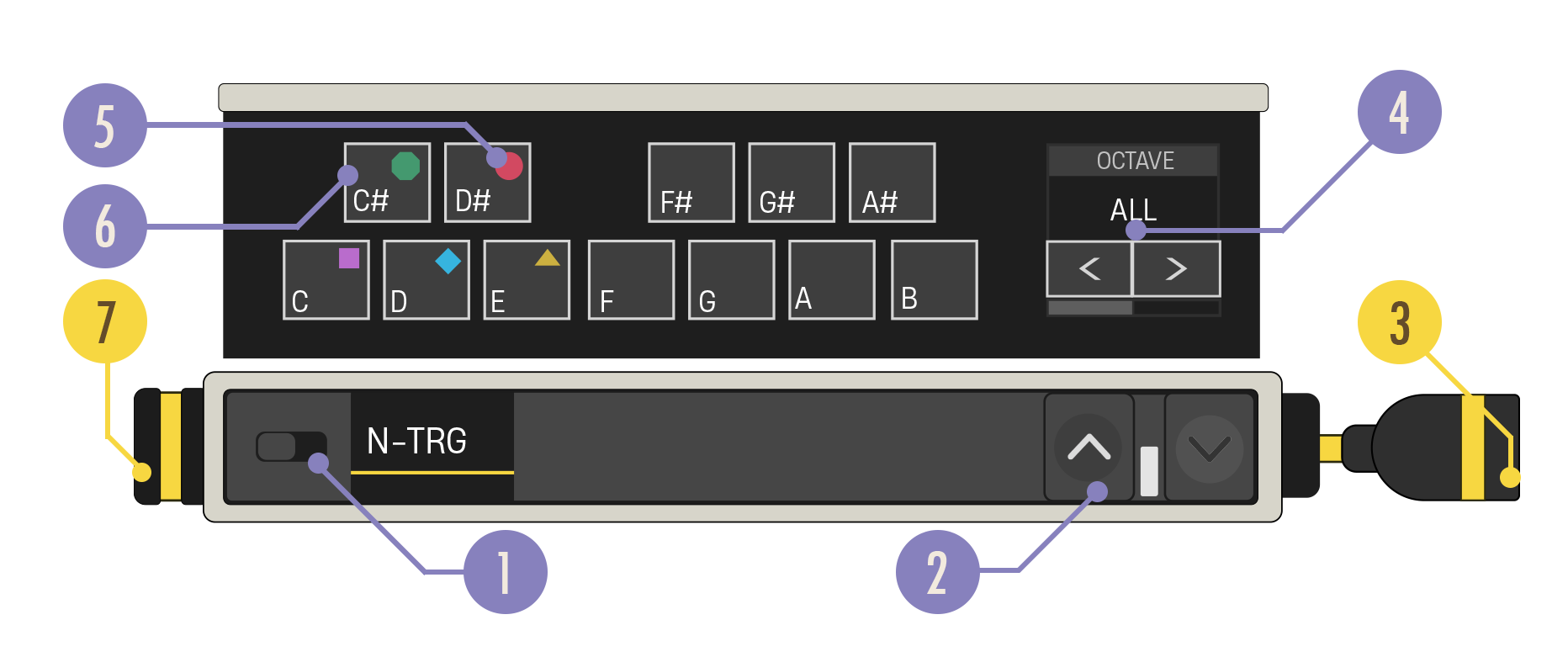
Note Trigger callouts

Option Values Description
1. Enabled Switch On, Off Note data is always passed through this device unchanged. When Disabled, note data is passed through unchanged and no Events are sent.
2. Expand Buttons Closed, Open Expand the device to reveal more customization options.
3. Note Out Cable N/A The Note Out cable needs to be connected to a yellow Note In port.
4. Octave Carousel All, 0-6 Select whether the device should be triggered by notes in any octave or in a specific octave.
5. Drum Note Shape Label Shapes When patching the Patchwork Drum Sequencer into the Note Trigger, these labels indicate which drum note shapes on the Drum Sequencer correspond to which notes.
6. Note Select Button Any number of notes. Default: No Notes Users can select each button and toggle it to be active/inactive. When a note is set to its active state, the device will send a message when it receives that note as input.
7. Note In Port N/A Can only receive a yellow Note In cable.

You're reading a preview

The full reference is free for BrainDeadGuild Discord members — sign in to read it all, or open the original at the source.

Sign in with Discord — free for members Read the original at Epic Games

Sign in with your BrainDead.TV / BrainDeadGuild Discord account for full access.

Comments

    Sign in to vote, comment, or suggest an edit. Sign in
    📄
    Source
    Epic Games

    © Epic Games. Official Epic developer documentation, shown here as a reference with a link to the original. All rights remain with Epic Games. Terms ↗

    View original Sources & licensing
    Request removal
    Last updated Dec 7, 2024
    Keep exploring
    More in Devices · 111 of 174
    Prev
    using patchwork note progressor devices in fortnite creative
    Next
    using patchwork omega synthesizer devices in fortnite creative
    Browse all files in this folder (A–Z)
    Next up
    • The **Note Trigger (N-TRG)** device is a musical version of the [Trigger device
    • For example, you could patch the Note Trigger to a [Drum Sequencer
    • Using Creature Spawner Devices In Fortnite Creative
    • vices.
    • In [**Create mode**
    • 1. Drag a Note Trigger device onto your island.
    Related topics
    • Using Patchwork Note Trigger Devices In Fortnite Creative Devices
    • Fortnite Glossary Verse Language
    • Fortnite Creative Glossary Verse Language
    • Using Patchwork Devices In Fortnite Creative Devices
    • Getting Started With Patchwork In Fortnite Creative Audio

    Related

    Open in graph →

    Linked docs

    • Using Trigger Devices In Fortnite Creative
    • Using Patchwork Drum Sequencer Devices In Fortnite Creative
    • Using Creature Spawner Devices In Fortnite Creative
    • Using Patchwork Note Sequencer Devices In Fortnite Creative

    Related topics

    • Using Patchwork Note Trigger Devices In Fortnite Creative
    VerseIsland · an archipelago of Verse & UEFN knowledge
    🗺️ Island atlas Learn Guides History About & Press Sources & Licensing Status

    Not affiliated with Epic Games. Fortnite, UEFN, Unreal Engine, and Verse are trademarks of Epic Games, Inc. Content is attributed to its source — see Sources & Licensing.

    🦜

    Scout · your island guide

    The Isle of Verse