VerseIsland
Feed Learn Leaderboard Guides Reference Explore Search Docs Verse Library
Sign in
Feed Learn 📖 Codex Leaderboard Guides Reference Explore Search Docs Verse Library
Fortnite › Physics · Up to Fortnite · Physics · 2 of 26 in Physics
Browse Fortnite

Configure Simulation Settings

To configure your simulation settings, you first need to set the proxy deformer. Then you can simulate collision and set up the solver, which controls the quality of the simulation.

Set the Proxy Deformer

In this section, you will set up the Proxy Deformer. This deformer uses the simulation mesh to deform the render mesh. You will also set up two selections for the jacket and holster to make sure they do not interfere with each other during simulation.

  1. Drag from the Collection pin and search for then select WeightMapToSelection, then connect the Name pin of the MaxDistance Weight Map to the Weight Map Name pin of the WeightMapToSelection node. The WeightmapToSelection node converts the painted weight map into a selection of vertices that can be processed by the Proxy Deformer.
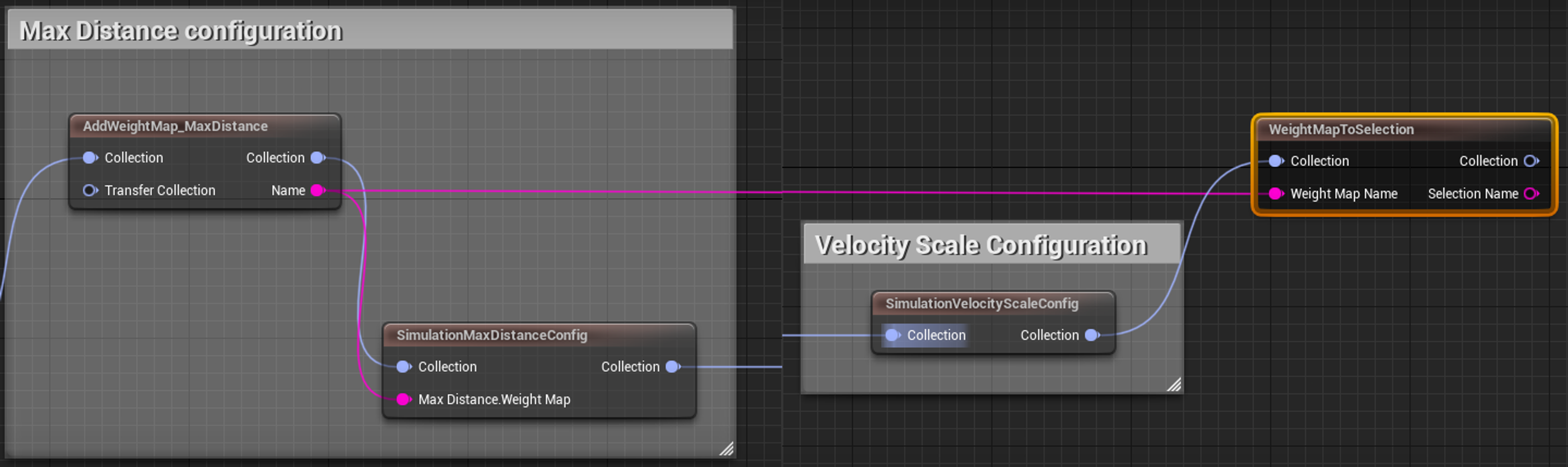
    Add a WeightMapToSelection node and connect it to the AddWeightMap_MaxDistance node

  2. Drag from the Collection pin and search for then select Selection under the Cloth category. Name the node Selection_Holster. Go to the Node Details panel and set the Name to HolsterFaces and the Group to SimFaces.

You're reading a preview

The full reference is free for BrainDeadGuild Discord members — sign in to read it all, or open the original at the source.

Sign in with Discord — free for members Read the original at Epic Games

Sign in with your BrainDead.TV / BrainDeadGuild Discord account for full access.

Comments

    Sign in to vote, comment, or suggest an edit. Sign in
    📄
    Source
    Epic Games

    © Epic Games. Official Epic developer documentation, shown here as a reference with a link to the original. All rights remain with Epic Games. Terms ↗

    View original Sources & licensing
    Request removal
    Last updated Feb 11, 2026
    Keep exploring
    More in Physics · 2 of 26
    Prev
    collision decision lesson plan in fortnite creative
    Next
    getting started with physics
    Browse all files in this folder (A–Z)
    Next up
    • Import your Clothing Asset into UEFN
    Related topics
    • Creating Clothing Assets For Unreal Editor For Fortnite Using Unreal Engine Assets
    • Configure Simulation Settings In Unreal Editor For Fortnite Physics
    • Configure Clothing Asset Parameters In Unreal Editor For Fortnite Assets
    • Create Your Clothing Asset In Unreal Engine In Unreal Editor For Fortnite Assets
    • Getting Started With Physics Physics

    Related

    Open in graph →

    Related topics

    • Creating Clothing Assets For Unreal Editor For Fortnite Using Unreal Engine
    • Configure Simulation Settings In Unreal Editor For Fortnite
    • Configure Clothing Asset Parameters In Unreal Editor For Fortnite
    • Create Your Clothing Asset In Unreal Engine In Unreal Editor For Fortnite
    • Getting Started With Physics
    VerseIsland · an archipelago of Verse & UEFN knowledge
    🗺️ Island atlas Learn Guides History About & Press Sources & Licensing Status

    Not affiliated with Epic Games. Fortnite, UEFN, Unreal Engine, and Verse are trademarks of Epic Games, Inc. Content is attributed to its source — see Sources & Licensing.

    🦜

    Scout · your island guide

    The Isle of Verse