
Creating Custom Verse Components in UEFN
You can create your own components using Verse to add to your entities. With custom Verse components, you can spawn and remove entities from the scene, add or remove components from entities, create your own behaviors such as a disappearing entity on a loop, or whatever you think of!
Creating a New Verse Component
You can create a new Verse component from the Verse template file.
To create a new Verse component:
-
In the Details panel for your entity, choose Add Component > New Verse Component.
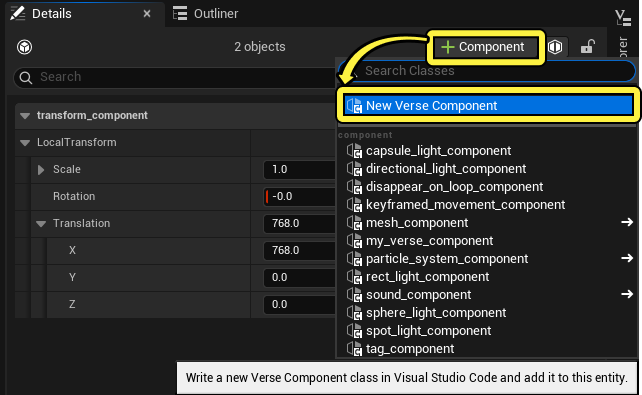
You can also create a new Verse component by adding a new Verse file through Verse Explorer.
-
From the list of Verse code templates, choose Scene Graph Component.
-
Set Component Name to the name of your Verse-authored component. In this example, the component is named
my_verse_component. -
Click Create to create your Verse component file. Your Verse-authored component now appears in the list of components when you choose to add a component to your entity.
You're reading a preview
The full reference is free for BrainDeadGuild Discord members — sign in to read it all, or open the original at the source.
Sign in with your BrainDead.TV / BrainDeadGuild Discord account for full access.