
Editing Landscape Materials
Unreal Editor for Fortnite (UEFN) has different material instances for custom terrain that you can create using Landscape Mode. The Paint tools in Landscape Mode provide a way to edit the top layer of your terrain. Select from the following material instances for your terrain:
-
MI_Landscape_Chpt2 (Apollo)
-
MI_Landscape_Chpt4 (Asteria)
-
MI_Fortnite_Customizable_01
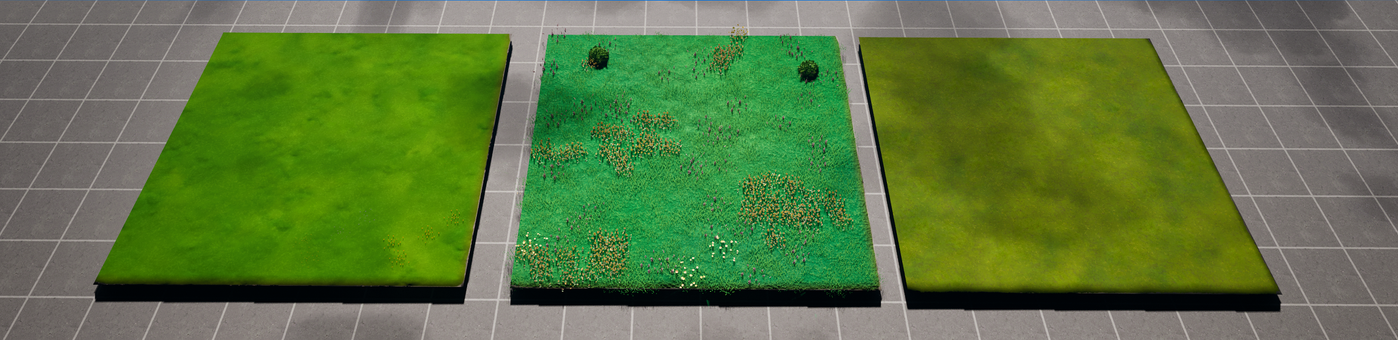
From left to right, the materials are Chapter 2, Chapter 4, and Customizable.
The Chapter 2 material instance is the classic Fortnite Battle Royale landscape material. The Chapter 4 landscape material is from Fortnite Battle Royale Chapter 4.
Each of the Battle Royale material instances creates a grassland with flowers, and simulates wind blowing through the grass. In addition to these features, the Chapter 4 material instance auto-generates small bushes, and uses Niagara to simulate leaves blowing in the wind and butterflies flying around the terrain.
You're reading a preview
The full reference is free for BrainDeadGuild Discord members — sign in to read it all, or open the original at the source.
Sign in with your BrainDead.TV / BrainDeadGuild Discord account for full access.