VerseIsland
Feed Learn Leaderboard Guides Reference Explore Search Docs Verse Library
Sign in
Feed Learn 📖 Codex Leaderboard Guides Reference Explore Search Docs Verse Library
Fortnite › Landscape · Up to Fortnite · Landscape · 7 of 19 in Landscape
Browse Fortnite

Painting The Terrain

Another way to change the appearance of your terrain is by painting the weight map layers. When you select either MI_Landscape_Chpt2 (Apollo) or MI_Landscape_Chpt4 (Asteria) for your terrain material, each has built-in layers that you can use to paint on top of the first layer.

Select Paint from the Landscape Mode stages and scroll down to Target Layers. You’ll see the different layers of the Landscape material. Each layer is numbered, these layers are defined in the Landscape material, and they automatically populate the list of Target Layers in the Landscape tool Paint mode.
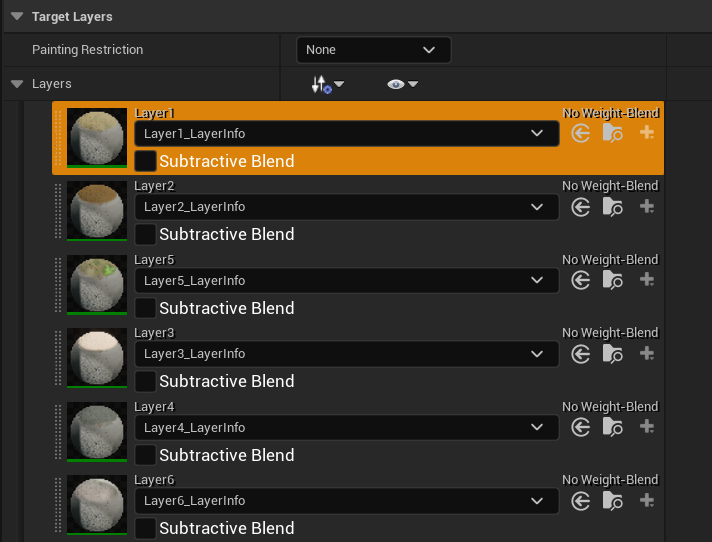
The landscape material layers.

You can use these layers to paint paths or the side of the road, to create dirt patches, and more. Select a layer from the dropdown menu to paint onto the landscape material outside the mouth of your cave, then change your Paint tool settings to:

Option Value
Tool Strength 0.5
Brush Size 350
Brush Falloff 0.3

Select another layer below the first one you chose and paint on top of the section you just painted. When using the MI_Landscape_Chpt2 (Apollo), layers higher in the stack are dominated by lower layers. You can even remove any paint you don’t want by pressing Shift + Left-Mouse to remove contents of a layer.

You're reading a preview

The full reference is free for BrainDeadGuild Discord members — sign in to read it all, or open the original at the source.

Sign in with Discord — free for members Read the original at Epic Games

Sign in with your BrainDead.TV / BrainDeadGuild Discord account for full access.

Comments

    Sign in to vote, comment, or suggest an edit. Sign in
    📄
    Source
    Epic Games

    © Epic Games. Official Epic developer documentation, shown here as a reference with a link to the original. All rights remain with Epic Games. Terms ↗

    View original Sources & licensing
    Request removal
    Last updated Feb 11, 2026
    Keep exploring
    More in Landscape · 7 of 19
    Prev
    landscape mode in unreal editor for fortnite
    Next
    placing foliage in a custom landscape in unreal editor for fortnite
    Browse all files in this folder (A–Z)
    Next up
    • Creating a Body of Water for Your Custom Landscape
    Related topics
    • Editing Landscape Material In Unreal Editor For Fortnite Materials/Vfx
    • Editing Landscape Material In Unreal Editor For Fortnite Materials/Vfx
    • Create A Custom Landscape In Unreal Editor For Fortnite Landscape
    • Generating New Terrain In Unreal Editor For Fortnite Landscape
    • Sculpting The Terrain In Unreal Editor For Fortnite Landscape

    Related

    Open in graph →

    Related topics

    • Editing Landscape Material In Unreal Editor For Fortnite
    • Editing Landscape Material In Unreal Editor For Fortnite
    • Create A Custom Landscape In Unreal Editor For Fortnite
    • Generating New Terrain In Unreal Editor For Fortnite
    • Sculpting The Terrain In Unreal Editor For Fortnite
    VerseIsland · an archipelago of Verse & UEFN knowledge
    🗺️ Island atlas Learn Guides History About & Press Sources & Licensing Status

    Not affiliated with Epic Games. Fortnite, UEFN, Unreal Engine, and Verse are trademarks of Epic Games, Inc. Content is attributed to its source — see Sources & Licensing.

    🦜

    Scout · your island guide

    The Isle of Verse