
Getting Started with Devices
Devices are the core building blocks of game mechanics. The games you can build in Fortnite are vast when you have a clear understanding of the devices and how they work!
shortcuts to how to find, place, and modify devices, jump to:
General Device Categories
The categories below follow the categories laid out in the UEFN Content Browser. Creative uses tags to sort and filter devices that differ from the UEFN categories.
In UEFN, devices fall into one of these categories:
| Category | What They Do |
|---|---|
| **!**Experimental | Devices that are available for testing, but not for publishing. To see this category in the browser, you must first enable the experimental feature from the project settings. To enable an experimental feature: 1. From the toolbar near the top of the window, click the Project dropdown. 2. Select Project Settings. 3. Scroll down to the Experimental Access section, then toggle the feature you want to enable. These features can range from devices to island settings. The options also change periodically as features are moved into production readiness and new experimental features are added. |
| !Beta | Still in development, but available for devs to explore and use. |
| AI | Contains characters, enemies, wildlife, and friendly NPCs you can hire. Example devices include Creature Spawner, AI Patrol Path Node, and Creature Manager. |
| Audio | Devices that produce sound or music. |
| Audio > Patchwork | A suite of devices that you can use to create and manipulate music and visuals. Patchwork devices are a subcategory of Audio. |
| Environment | Elements that belong to the world rather than a player character, but that the player can interact with. For example, a player can collect fireflies from a Firefly Spawner and use them against other players to take away health points. Also, fruits from a Healing Cactus device can restore player health. |
| Environment > Hazard | Can deal damage. Examples include Bomb Flower and Explosive devices. |
| Gameplay | General gameplay ingredients that interact with the player. Examples include the Teleporter device — a rift that moves a player instantly to another location on the island, and the Target Dummy device that players can use to practice shooting ranged weapons. |
| Item | Devices that provide items to players or take them away. |
| Logic | Help build game logic. Includes devices like timers, triggers, and trackers. |
| Mode | Devices that support specific game modes. For example, Race Checkpoint and Race Manager devices support racing games. |
| Physics | Emulate the effects of real-world physics, such as gravity and movement. |
| Power Up | Devices that grant power-ups.These usually give buffs like extra damage or health. For example, The Damage Amplifier Powerup device can multiply the damage a player can deal to another player or NPC. |
| System | System devices can be used for things like changing a player's team, class, score, or analytics that let the developer track data. Examples of system devices include the Player Spawner, which determines where on the island a player will spawn or respawn, and the Changing Booth, which lets a player access their locker and change outfits mid-game. |
| Trap | Devices that can be used to trap or damage players or enemy AI. In Creative, the only trap device is the Trick Tile, which destroys any object it is placed on when it's activated. Creative also has traps included in the Content Items category, but these cannot be customized the way a trap device can. In UEFN, there are many more trap devices available in UEFN. Examples include the Environmental Trap - Ice Block, which can cause players to slip and slide on the ice. And the Environmental Trap - Launch Pad, which shoots players up into the air. |
| Traversal | Things that provide movement across an island, but that aren't vehicles. Examples include devices like Zipline or D-Launcher. |
| UI | Devices that communicate information to players, like Beacon devices that indicate locations of things, or Billboard devices that display customized text like onboarding instructions or directions. Other UI devices can be used for gameplay interactions, like the Skilled Interaction device, that you can use to create button press interactions that vary based on user input, and Conversation devices (UEFN only) for creating interactive dialogs between players and NPCs. |
| Vehicle | Spawns vehicles that range from surfboards to war buses, with a lot in between. |
| Vehicle > Gameplay | Vehicle-related devices that affect gameplay that involves vehicles, like fuel pumps and service stations. |
To learn more about a specific device and its modifiable options, see the pages under Using Devices or UEFN-Only Devices for those devices only available in UEFN.
Device Functions and Events
When you place props on an island, they are primarily thematic decoration, and are only involved in gameplay in a static (unmoving) way — like building barriers for a parkour-mode game, or creating paths for a maze adventure. Otherwise, props are there primarily to set the theme of the island.
Unlike props, which are passive, devices do things when they are triggered. The things they do are called functions.
When one device sends a signal to another device, this is called an event. An event triggers one or more devices to do a specific thing or set a particular condition, and that action or condition is called a function.
A function can be triggered when the device receives a signal from another device event. Events can be instigated (started) by player actions, time triggers, or other devices.
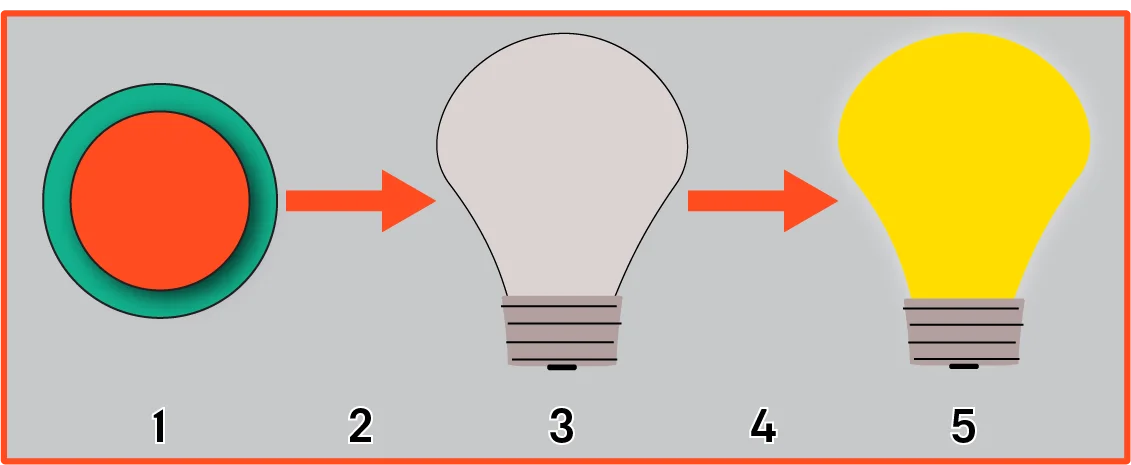
In the image above:
- A player interacts with a button, which
- sends a signal to
- a light source that's set to OFF by default.
- This triggers an event that
- turns on the light source.
To make these mechanics work between devices, the device functions and events have to be bound.
In UEFN, you can bind functions to events for other devices, but you can't bind events to functions.
In Creative (Live Edit), you can bind functions to events or events to functions.
Devices in UEFN
In UEFN, Fortnite devices are kept together in a folder named Fortnite > Devices. This folder can be accessed either from the Content Drawer or a Content Browser.
If you're coming into UEFN from Unreal Engine (UE), the user interface will be familiar in many ways, but not identical. See Editor User Interface for more information.
In UEFN, Fortnite devices are kept together in a folder named Fortnite > Devices. This folder can be accessed either from the Content Drawer or a Content Browser.
Find and Place a Device
To find an place a device in UEFN:
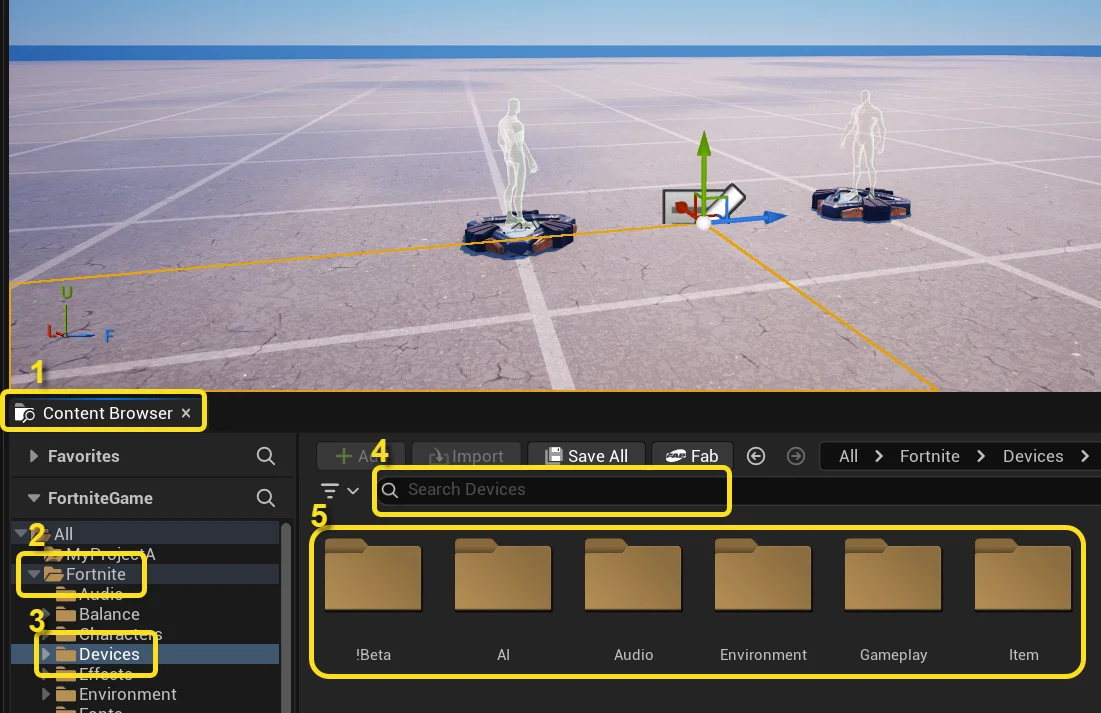
The path to devices is All > Fortnite > Devices. Each folder contains groupings of similar devices. Clicking the folder shows the devices in that group.
- Open a Content Browser panel.
- Find the Fortnite folder and click to expand.
- Click Devices to expand.
- The easiest way to find a device is to use the search bar.
- To browse devices, click a folder to expand it, find the device you want, and drag it into the viewport.
Modify Device Options
To customize options for a device:
- Select the device in your viewport or on the Outliner panel.
- View the available options in the Details panel.
- Click All to ensure all available options are shown. The other tabs are filters that limit the options that display.
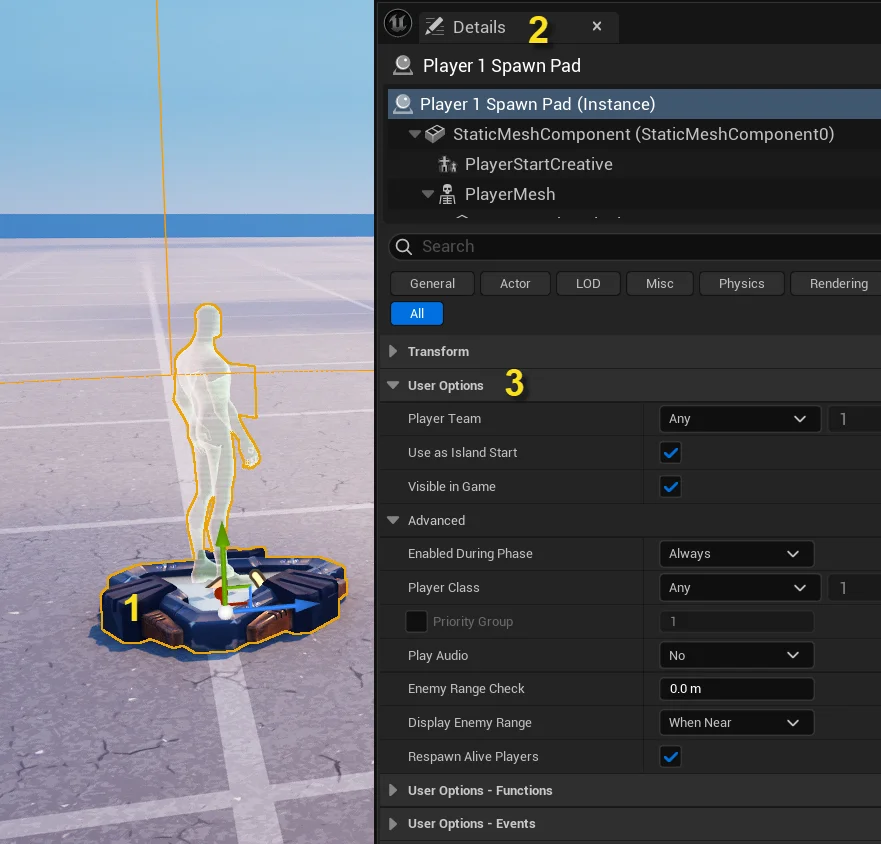
- Not all devices have the same options available.
- Some options are nested inside other options.
- Some options only become available when another option is enabled.
Bind Functions to Events
Functions and events are also found on the Details panel.
Events are shown for information only, which means you can retrieve/receive or "read" the value (event in this case), but cannot set, alter, or modify it. In UEFN, you can only bind a function to an event.
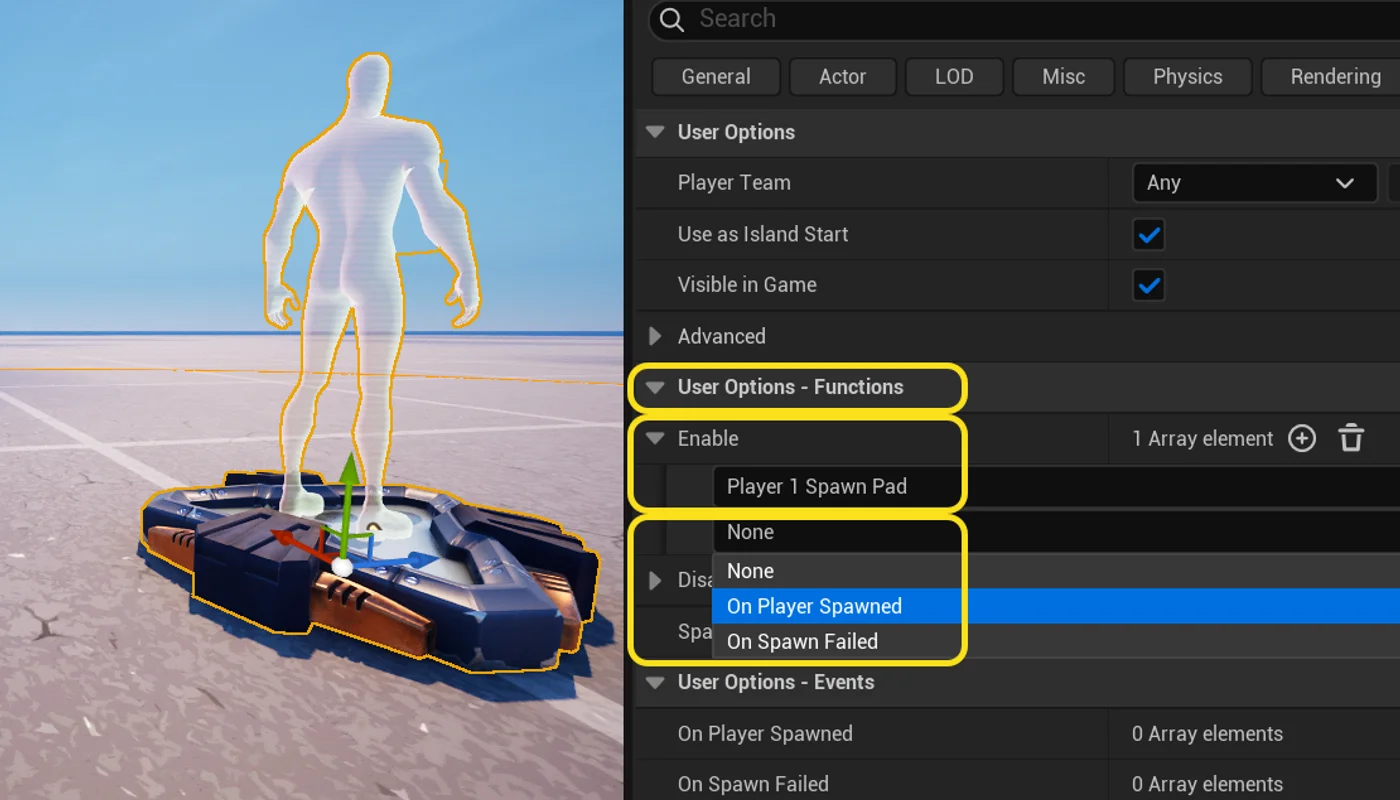
In UEFN, binding functions to events involves selecting array elements. In UEFN, an element is a single component in a group of components. An array is a container for storing similar elements. When setting up your functions, you can select the array element you want to bind the function to.
-
With a device selected, scroll down through the Details panel, then click the User Options - Functions to expand it.
-
Click the function you want to modify.
The list of functions varies based on the device you've selected.
-
From the list of available functions, click the + (plus) icon to add an array element. The array shows the functions available for that device.
-
Click the first dropdown, and select a device. If you have a lot of devices, you can use the search bar to find one more easily.
-
Click the second dropdown, and select the event you want to bind to this function.
Expand Device Functionality with the Verse API Reference
An application programming interface, or API, is a set of program instructions that can be used or modified in an existing software application. The Verse API Reference is an API library that provides ways to customize devices in UEFN by using Verse.
Extending a device's functionality using Verse can be more efficient than trying to program gameplay in Verse entirely.
Every device in UEFN has a corresponding Verse API that you can use to add or change device features beyond the default option modifications available in UEFN.
Not all devices have the same degree of customization available in the API. The customization available varies based on how much of the device code is accessible (exposed) in the API.
API Terms
There are a few basic concepts that can help you make best use of the Verse API Reference.
The definitions below are specific to Verse, and may have slightly different meanings in other areas of Fortnite.
| Term | What It Means |
|---|---|
| module | An atomic unit of code that can be reused. You can import a module into a Verse file in UEFN, and modify that code to customize it without breaking any dependencies to other units of code. |
| class | In Verse, a class is a template for creating objects that have similar properties and behaviors, defined by fields (variables) and methods (functions). Each device is a class. |
| hierarchy | Levels (hierarchies) of rank, importance, or control. Common hierarchical relationships are parent/child or superclass/subclass. Objects lower in the hierarchy inherit properties and methods from objects above it. |
| inheritance | In Verse, you can create a new class that extends an existing class definition by adding or modifying properties. This is often called subclassing or inheritance, because one class inherits definitions from the other class. |
| variable | A value that can be changed during runtime. |
| function | The code that provides instructions for performing an action. |
| member | In Verse, a member is a variable or function that is part of a composite data structure, such as a class or module. Member variables are sometimes called fields, and member functions are sometimes called methods. |
| Verse-authored device | A device for use in UEFN that is programmed directly using Verse. |
| struct | A struct (short for structure), is a user-defined type that allows you to group several related variables together. Several structs are available in the API. A common use of structs is for error messages, where message text and relevant data from the failed function are grouped |
Find a Device API
The device categories do not match the categories in the UEFN Content Browser. The device names also do not always match the name of the device in UEFN or Creative.
To find the API for a device in the Table of Contents:
- Go to the Verse API Reference.
- Find the Fortnite.com module, then the Devices module underneath it.
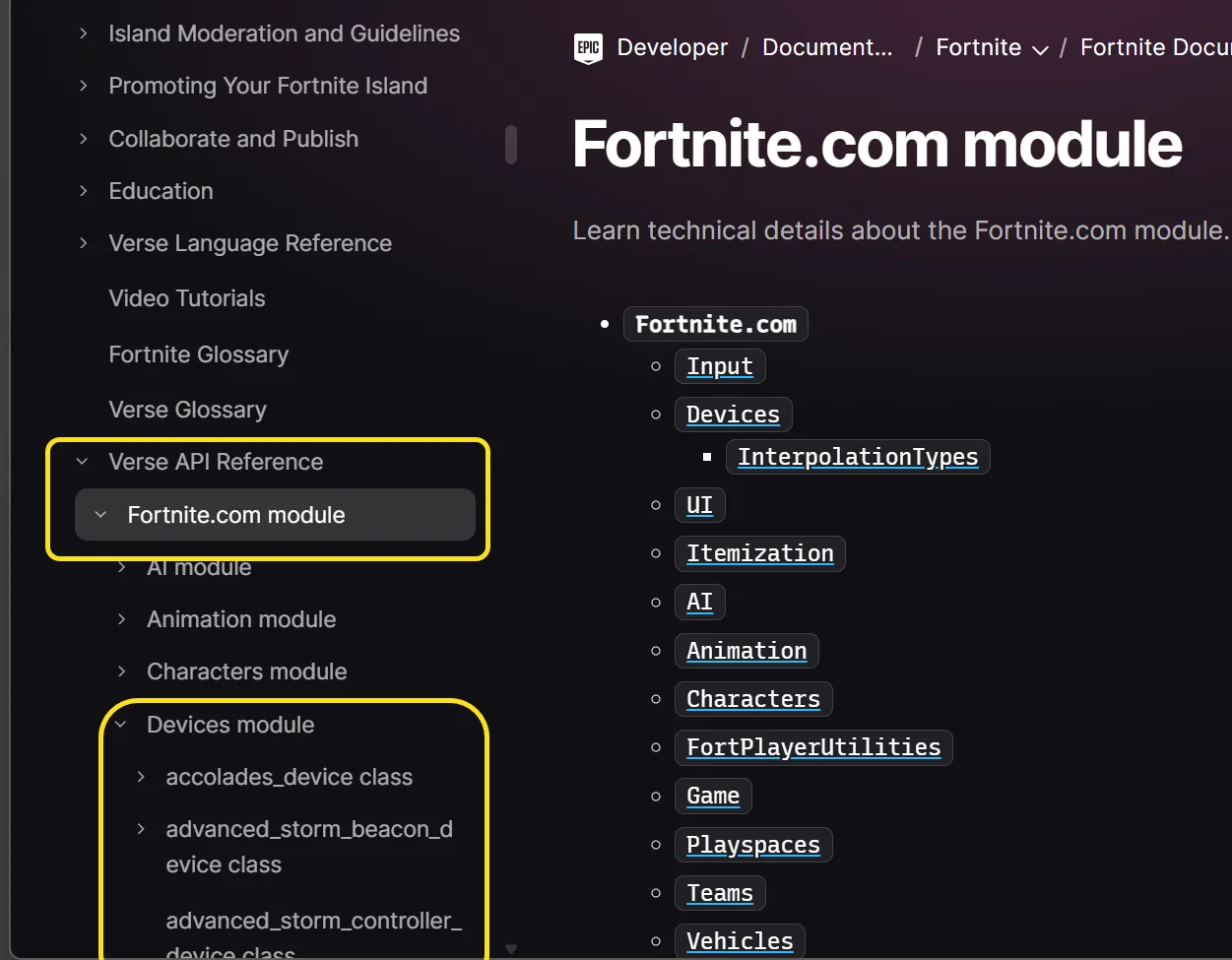
You can also search for the device by name or key words in the search bar.
For some good examples of how you can use the Verse API to expand device functionality, see the Spice Up the Gameplay with Verse page of the Build Your First Island in Fortnite tutorial.
To learn more about Verse, see the Verse Language Reference.
How the API Reference Pages Work
When you drill all the way down in the API to a device page, the important information to look for is:
-
Verse using statement: This is the statement you need to include in your Verse device to make use of the given module. For devices, it’s always:
using { /Fortnite.com/Devices } -
Inheritance hierarchy: This is a parent-child structure where child classes (subclasses) inherit variables and functions from the classes above it in the hierarchical structure.
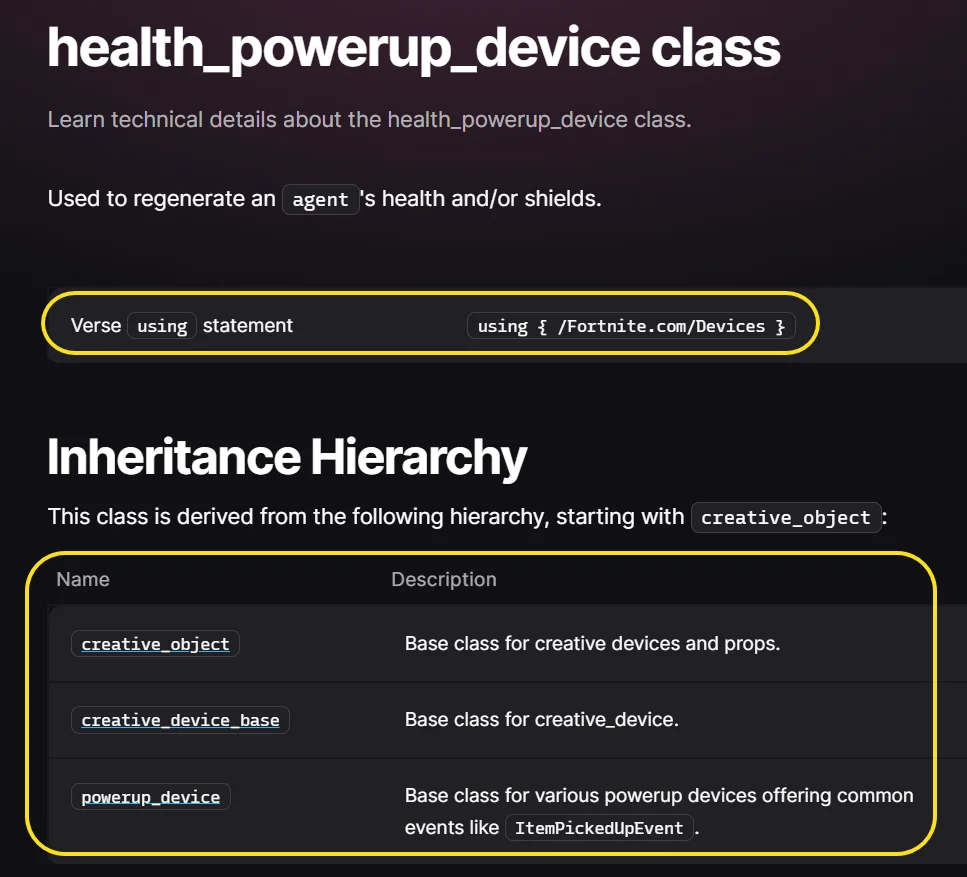
In this image, health_powerup_device_ inherits from powerup_device, which inherits from creative_device_base, and so on.
To follow how a typical API page is organized, see the health_powerup_device_class page.
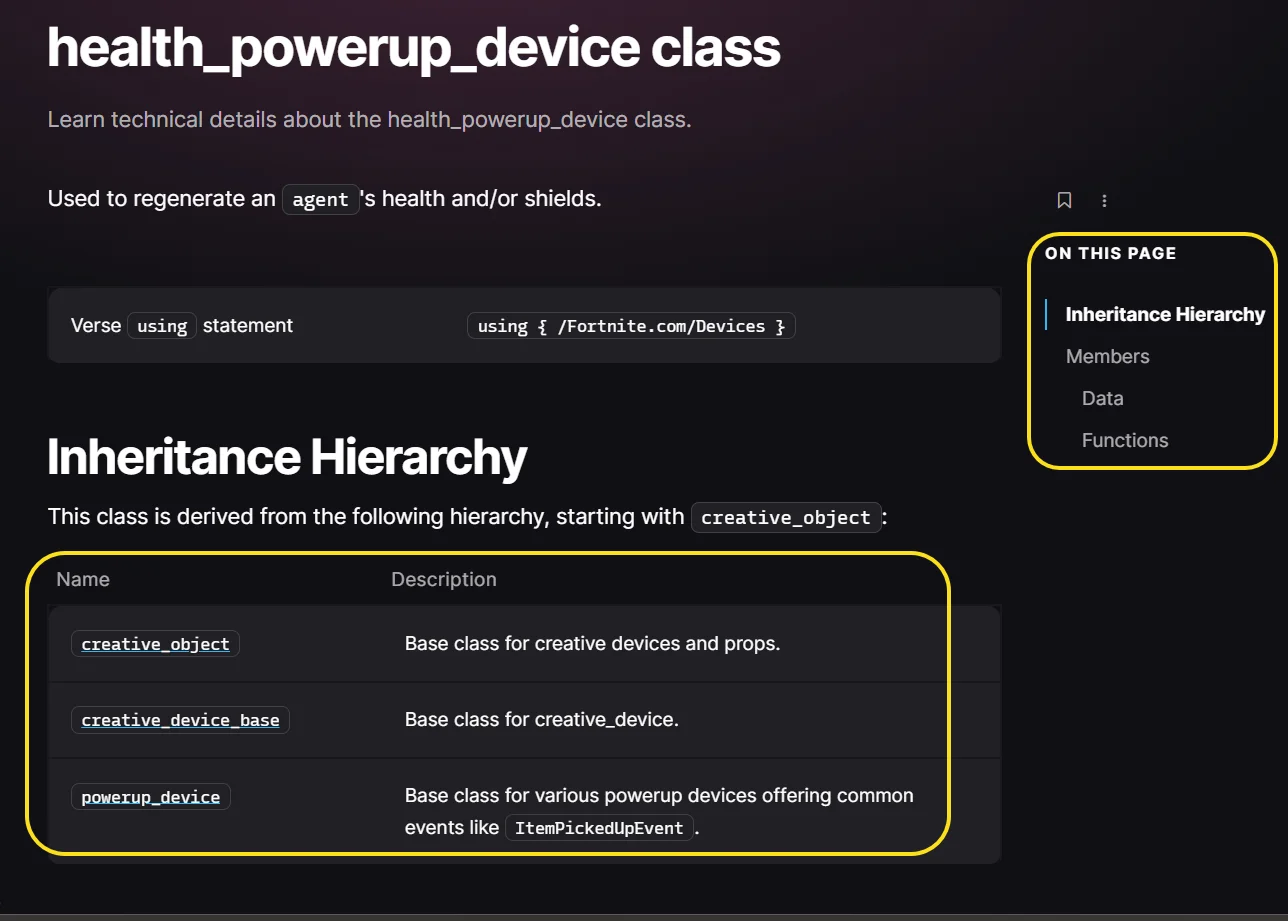
The menu on the right provides quick navigation to information. The information on the left under each topic gives the name and description.
The topics covered for each device are:
-
Inheritance Hierarchy: The device hierarchal structure.
-
Members: Broken down by Data and Functions.
-
Data: Includes variables and events that you can use to trigger behavior — for example, ItemPickedUpEvent is based on when a player picks up an item, which triggers something else to occur.
-
Functions: All of the device functions that are exposed by the API.
Make Your Own Device with Verse
In UEFN, you can also create your own Verse-authored device to create custom game mechanics from the ground up to address the unique requirements of your island. This can range from something as simple as a counter to track player eliminations to something complex like tying several devices together to leverage their combined functionalities.
To learn more about how to create your own device with Verse, see Modify and Run Your First Verse Program.
Devices in Creative
The devices in Creative are mostly the same as those available in UEFN, but the way you find, place, and modify them is very different.
Find a Device
To find a device:
-
From Create mode, press the M key, then click Content.
-
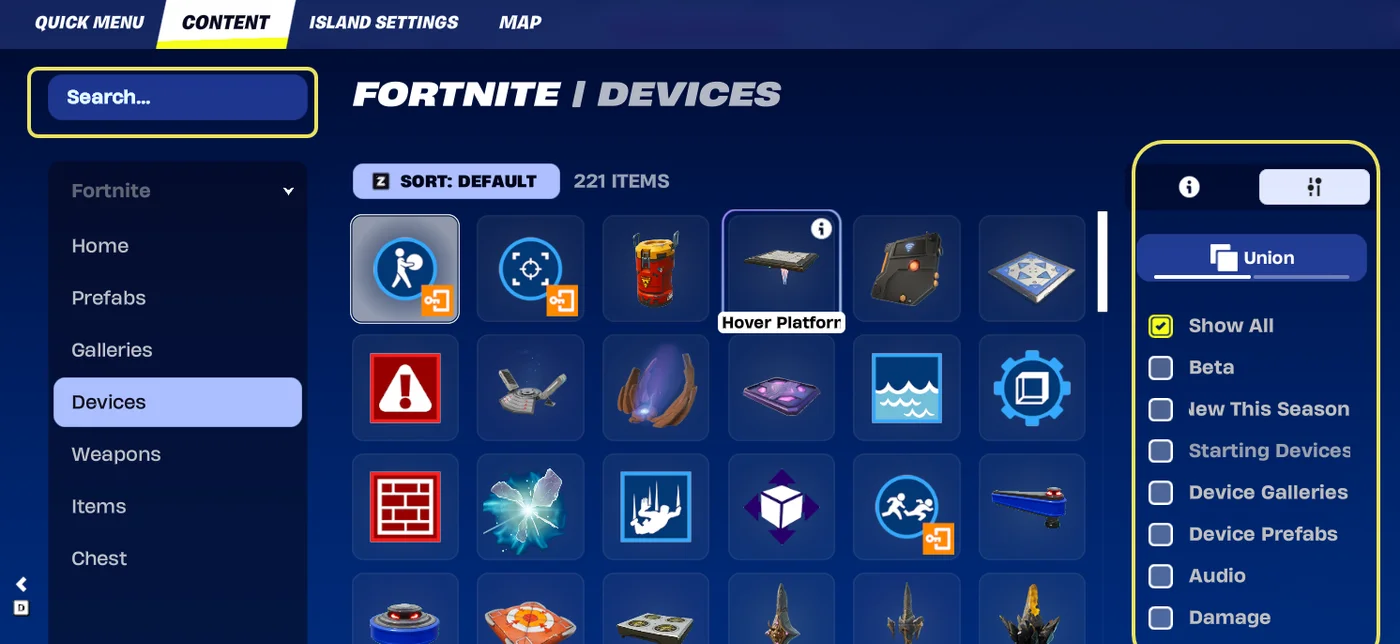
Select the Devices category on the left. From here, you can browse the entire inventory of devices, or narrow your search.
-
Narrow your search (optional):
- Use the search bar to search by device name.
- Filter devices in the right panel with tags.
- Click the Sort button to sort the results alphabetically.
Place a Device
There are different ways you can place a device on your island.
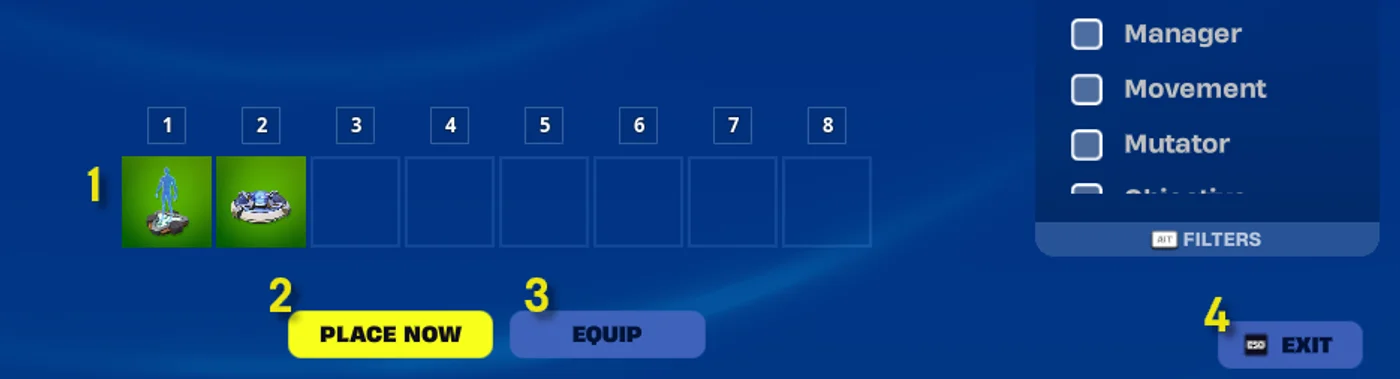
-
Select the device then:
- Click the Quick Bar tile,
- Press the corresponding tile number, or
- Drag the device on to the tile.
The device should display on the Quick Bar when you return to your island.
-
Click Place Now. This places the device directly onto your island, and returns you to the island.
-
Click Equip to add it to the next available tile on your Quick Bar.
-
Click Exit to return to your island.
For more on how to place, resize, copy, and delete devices (plus a whole lot more!), see Hotkeys and Keybinding Shortcuts. The device should display on the Quick Bar when you return to your island.Click Equip to add it to the next available tile on your Quick Bar.Click Exit to return to your island.
Modify Device Options
Because Creative can be used on multiple gaming devices, from PCs to consoles and handheld devices, the UI is more visual — and larger — compared to UEFN.
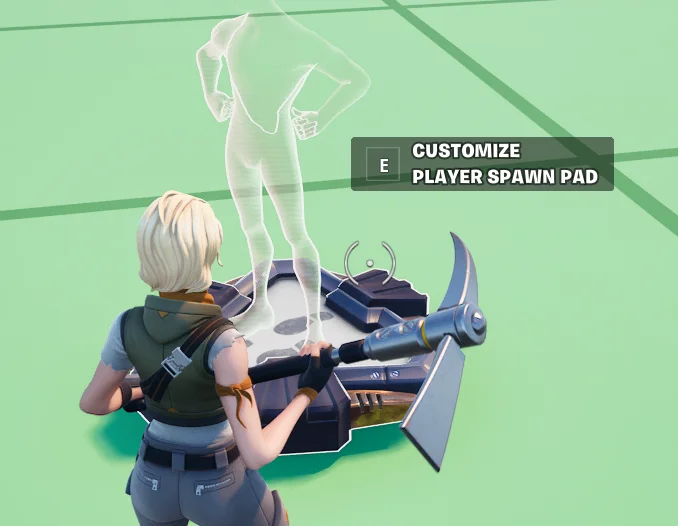
To customize device options in Creative, approach a device and press E to open the Customize panel.
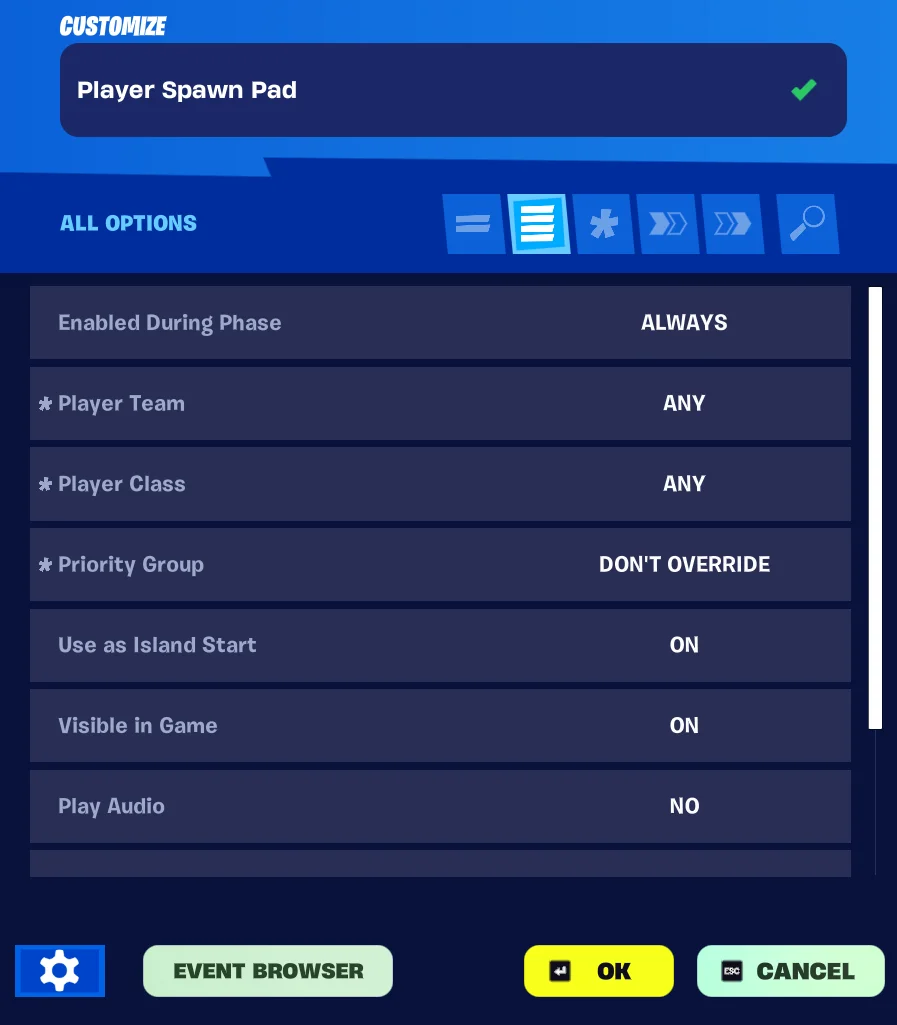
The panel has tabs that you can use to navigate between the different options:
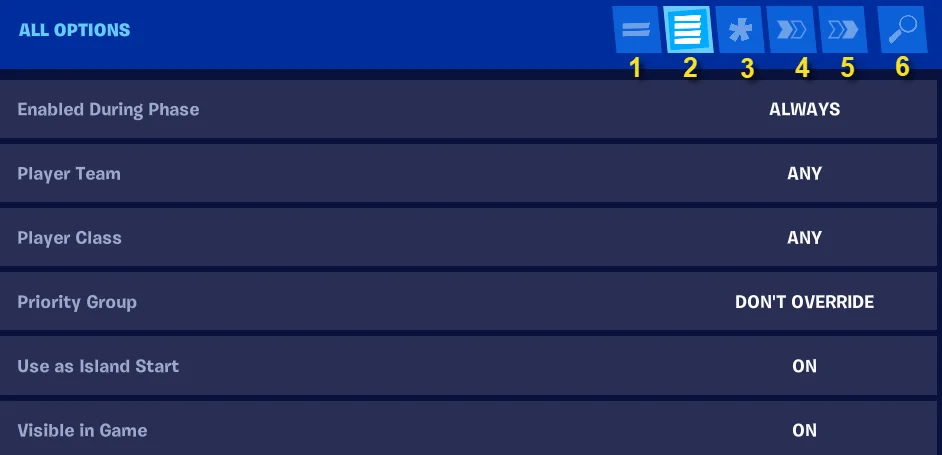
| Options Tab Name | Description | |
|---|---|---|
| 1 | Basic Options | These are the most common options that you can customize. |
| 2 | All Options | This tab shows options available for the device. |
| 3 | Modified Options | This shows the modifications you’ve made. |
| 4 | Functions | Use this tab to bind a function to an event. |
| 5 | Events | Use this tab to bind an event to a function. |
| 6 | Search | Some devices have a lot of available options. If you know the option name, you can use the Search tab to find a specific option. |
Bind Functions and Events
In Creative, you can bind functions to events or events to functions.
-
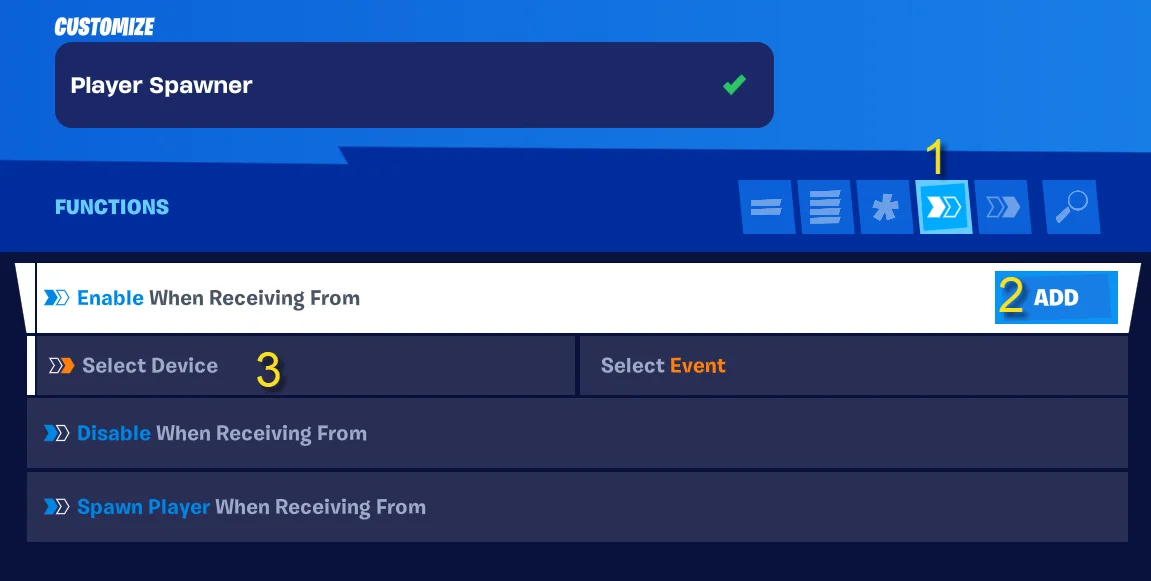
With the Customize device panel open, click the Functions tab.
-
Select a function then click Add.
-
Click Select Device and select from the Device dropdown menu.
-
Click Select Event to bind the device to an event that triggers the function for the device.
If more than one device or event triggers a function, click the Add button to add a line and repeat these steps.
You can also bind devices from the Events tab.
Tips for Customizing Devices in Creative
Every device has its own specific settings that you can modify, but there are a few useful features common to most devices.
Click the settings (gear) icon at the bottom of the panel to open a settings menu.
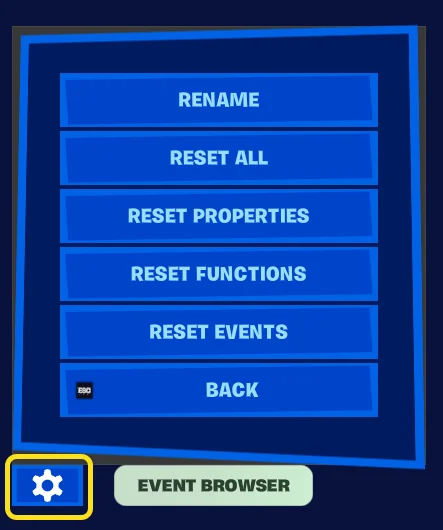
Rename
Give the device a custom name or reset to the default name.
You can also rename the device at the top of the Customize panel.
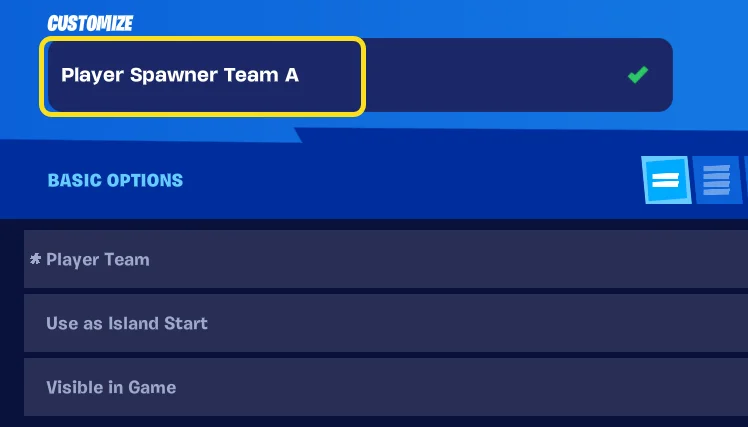
Giving a device a unique name is helpful if you are using multiple versions of the same device. For example, if you have multiple Wildlife Spawner devices, naming each one based on the type of wildlife it spawns makes it easier to find the right device if you want to change your customizations later.
Renaming devices is also helpful when you use the Event Browser.
Reset All
Most devices have multiple settings that you can customize. This resets all of the options back to default. This also resets the device name if you've changed it.
Reset Properties
This resets any option values back to the defaults, but does not change the device name.
Reset Functions
This only resets any functions you've defined for a device.
Reset Events
This only resets any events you've defined for a device.
The resets are great for when you want to start over on device customization, or if you want to make two of the same device with very different settings.