VerseIsland
Feed Learn Leaderboard Guides Reference Explore Search Docs Verse Library
Sign in
Feed Learn 📖 Codex Leaderboard Guides Reference Explore Search Docs Verse Library
Fortnite › Devices · Up to Fortnite · Devices · 64 of 1369 in Devices
Browse Fortnite

Using Accolades Devices in UEFN

Want to grant players Battle Pass XP while they play your UEFN experience? This tutorial shows you how to use the Accolade device to grant XP to players through UEFN and Verse.

For more information on how this device grants players XP, see Accolade Devices for Fortnite Creative.

Awarding XP for Zombie Eliminations

  1. Launch UEFN from the Epic Game Store.

    UEFN

  2. Create a new island or load an existing island.

  3. In the Content Browser, navigate to All > Fortnite > Devices and search for "accolade".
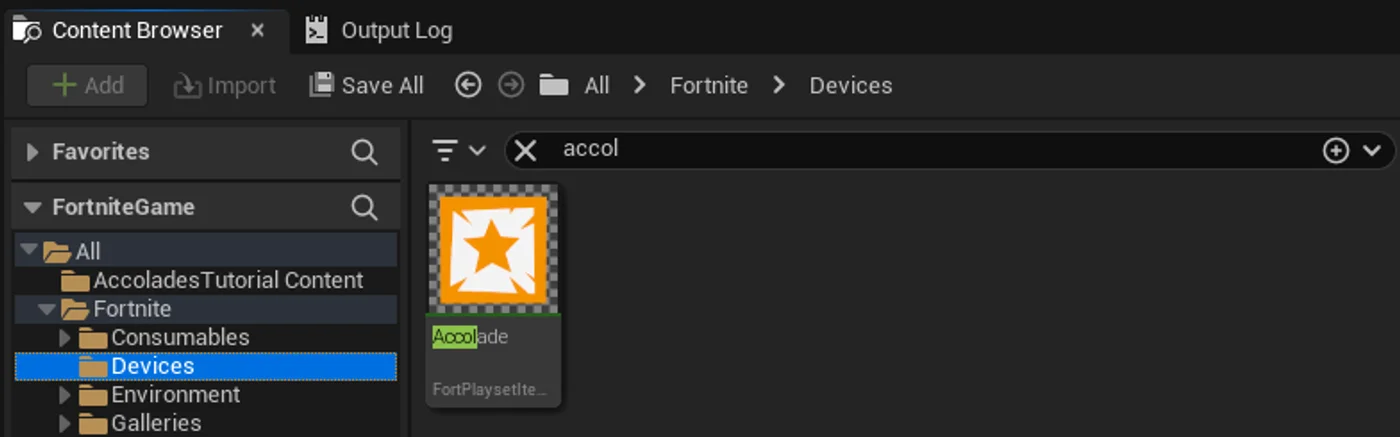
    accolades search

  4. Drag the Accolade device into your level.

    Drag accolade

  5. Make sure the Accolade device is selected.

  6. In the Details panel, modify the following User Options:

You're reading a preview

The full reference is free for BrainDeadGuild Discord members — sign in to read it all, or open the original at the source.

Sign in with Discord — free for members Read the original at Epic Games

Sign in with your BrainDead.TV / BrainDeadGuild Discord account for full access.

Comments

    Sign in to vote, comment, or suggest an edit. Sign in
    📄
    Source
    Epic Games

    © Epic Games. Official Epic developer documentation, shown here as a reference with a link to the original. All rights remain with Epic Games. Terms ↗

    View original Sources & licensing
    Request removal
    Last updated May 12, 2026
    Keep exploring
    More in Devices · 64 of 1369
    Prev
    using accolades devices in fortnite creative
    Next
    using advanced storm controller beacon devices in fortnite creative
    Browse all files in this folder (A–Z)
    Next up
    • For more information on how this device grants players XP, see [Accolade Devices
    • turret-range
    • Conditional button options
    • ### Creating the Verse Script
    • Verse Devices Details
    • To **Publish** your island, see [Publishing Projects
    Related topics
    • Using Accolade Devices In Unreal Editor For Fortnite Devices
    • Using Accolades Devices In Fortnite Creative Devices
    • Using Devices In Fortnite Devices
    • Using Devices In Fortnite Creative Devices
    • Accolades Device Gameplay Examples In Fortnite Creative Devices

    Related

    Open in graph →

    Linked docs

    • Using Accolades Devices In Fortnite Creative

    Related topics

    • Using Accolade Devices In Unreal Editor For Fortnite
    • Using Accolades Devices In Fortnite Creative
    • Using Devices In Fortnite
    • Using Devices In Fortnite Creative
    VerseIsland · an archipelago of Verse & UEFN knowledge
    🗺️ Island atlas Learn Guides History About & Press Sources & Licensing Status

    Not affiliated with Epic Games. Fortnite, UEFN, Unreal Engine, and Verse are trademarks of Epic Games, Inc. Content is attributed to its source — see Sources & Licensing.

    🦜

    Scout · your island guide

    The Isle of Verse