
Create Two-sided Materials
Use a two-sided Material to create the leaves of a bush or a depth effect on your mesh. Begin by selecting a base color and add onto it with more Material nodes.
-
Create a new Material in your project and double-click the Material thumbnail to open the Material Editor.
-
Select the Main Material node and check the Two Sided option in the Details panel.
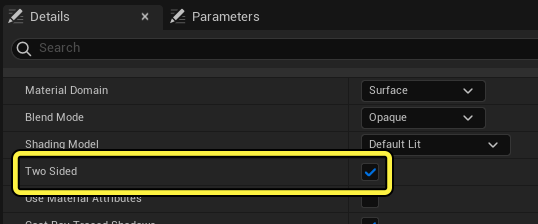
-
Add the following nodes:
- 2 X Constant 3Vector expression node
- TwoSidedSign node
- Saturate node
- Interpolate node
-
Select the first Constant 3Vector expression node and add a color, then drag off the node and plug it into the A input on the Lerp node.
-
Select the second Constant 3Vector expression node and add a color, then drag off the node and plug it into the B input on the Lerp node.
-
Drag off the TwoSidedSign node and plug it into the Saturate node.
-
Drag off the Saturate node and plug it into the Alpha input on the Lerp node.
-
Drag off the Interpolate node and plug it into the Material root node.
You're reading a preview
The full reference is free for BrainDeadGuild Discord members — sign in to read it all, or open the original at the source.
Sign in with your BrainDead.TV / BrainDeadGuild Discord account for full access.