VerseIsland
Feed Learn Leaderboard Guides Reference Explore Search Docs Verse Library
Sign in
Feed Learn 📖 Codex Leaderboard Guides Reference Explore Search Docs Verse Library
Fortnite › Cinematics · Up to Fortnite · Cinematics · 8 of 115 in Cinematics
Browse Fortnite

Day Sequence 2 North Biome

North - Winter

The quadrants provide four distinct biomes for you to explore. To start in the North biome, press the 2 key. This quadrant has the most drastic environment lighting changes of the four quadrants.
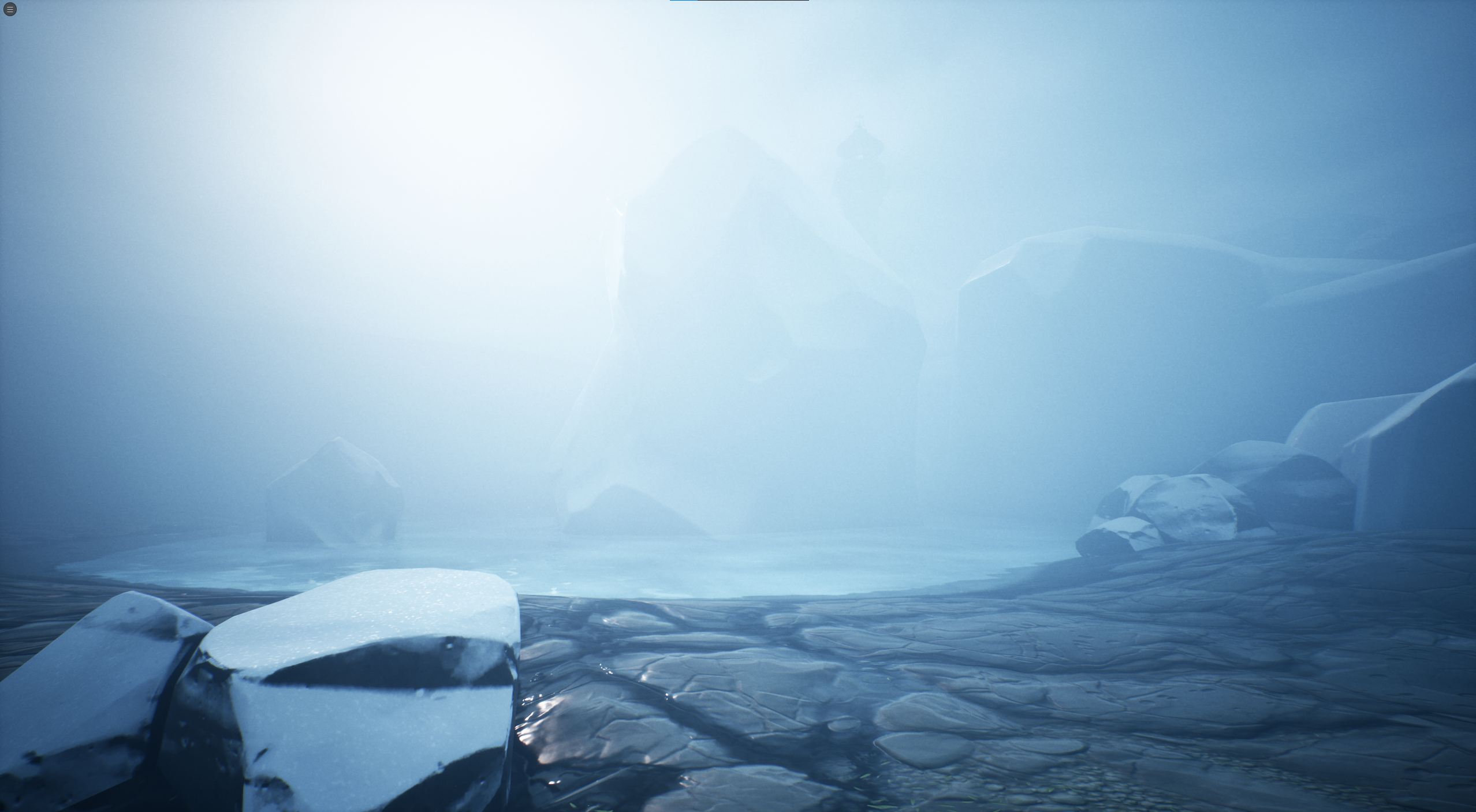
The North quadrant is the most extreme environment set up out of the all quadrants.

A good light design strategy is to start with a drastic change to your light settings as this sets the boundaries for the look of your project. This also gives you a feel for how much is too much or too little.

This also means you won't waste time with small adjustments that make it harder to see what lighting settings you’re adjusting without easily showing the results of your adjustments.

Priorities

It's important to understand how to use the priorities of the Post Process Volumes included in the Day Sequence device and Lumen Exposure Manager, and what they’re capable of.

Inside the North folder, you’ll find Day Sequence Device_North and North_PPV. This is where the art direction starts to get more complex, so you’ll have to pay attention to the Priority value in both of these.

You're reading a preview

The full reference is free for BrainDeadGuild Discord members — sign in to read it all, or open the original at the source.

Sign in with Discord — free for members Read the original at Epic Games

Sign in with your BrainDead.TV / BrainDeadGuild Discord account for full access.

Comments

    Sign in to vote, comment, or suggest an edit. Sign in
    📄
    Source
    Epic Games

    © Epic Games. Official Epic developer documentation, shown here as a reference with a link to the original. All rights remain with Epic Games. Terms ↗

    View original Sources & licensing
    Request removal
    Last updated Feb 11, 2026
    Keep exploring
    More in Cinematics · 8 of 115
    Prev
    day sequence 1 device information in unreal editor for fortnite
    Next
    day sequence 3 south biome in unreal editor for fortnite
    Browse all files in this folder (A–Z)
    Next up
    • The second PPV was added to polish the look with more contrast, [bloom
    • Unreal Editor For Fortnite Glossary
    • this setting to enhance the winter look.
    • 3. South Biome
    Related topics
    • Day Sequence 4 East And West Biomes In Unreal Editor For Fortnite Cinematics
    • Day Sequence Starter Island Template In Unreal Editor For Fortnite Cinematics
    • Day Sequence 1 Device Information In Unreal Editor For Fortnite Cinematics
    • Day Sequence 5 Postprocess Volumes In Unreal Editor For Fortnite Cinematics
    • Using Day Sequence Devices In Unreal Editor For Fortnite Cinematics

    Related

    Open in graph →

    Related topics

    • Day Sequence 4 East And West Biomes In Unreal Editor For Fortnite
    • Day Sequence 3 South Biome In Unreal Editor For Fortnite
    • Day Sequence Starter Island Template In Unreal Editor For Fortnite
    • Day Sequence 1 Device Information In Unreal Editor For Fortnite
    • Day Sequence 5 Postprocess Volumes In Unreal Editor For Fortnite
    VerseIsland · an archipelago of Verse & UEFN knowledge
    🗺️ Island atlas Learn Guides History About & Press Sources & Licensing Status

    Not affiliated with Epic Games. Fortnite, UEFN, Unreal Engine, and Verse are trademarks of Epic Games, Inc. Content is attributed to its source — see Sources & Licensing.

    🦜

    Scout · your island guide

    The Isle of Verse