VerseIsland
Feed Learn Leaderboard Guides Reference Explore Search Docs Verse Library
Sign in
Feed Learn 📖 Codex Leaderboard Guides Reference Explore Search Docs Verse Library
UEFN › Building & Props · Up to UEFN · Building & Props · 59 of 71 in Building & Props
Browse UEFN

Prefab Editor User Interface

The Prefab Editor consists of a menu bar, two toolbars, and three main regions.
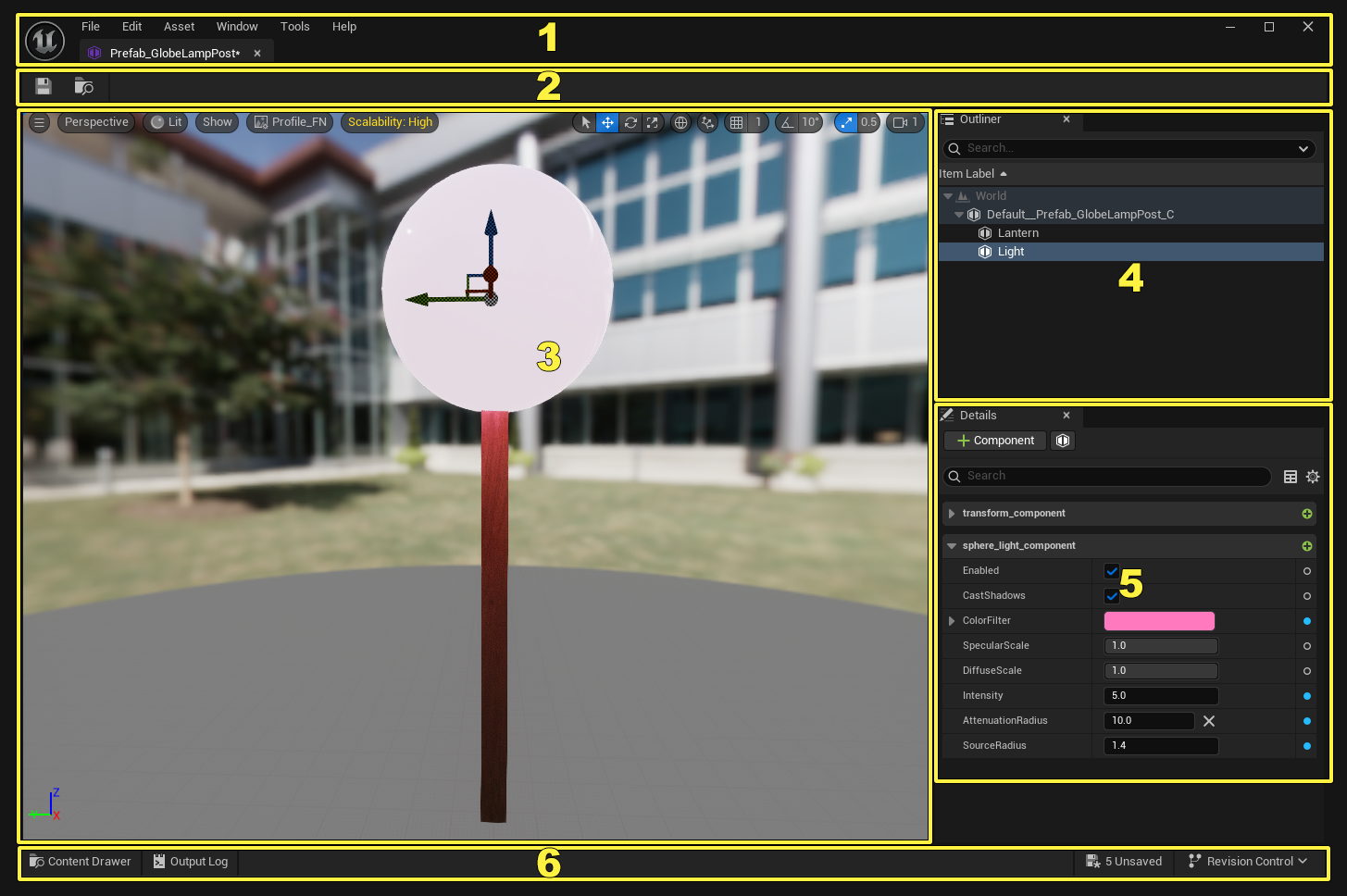
Click image to enlarge.

Number Description
1 Menu Bar
2 Toolbar
3 Viewport
4 Outliner Panel
5 Details Panel
6 Bottom Toolbar
  • Close panels by clicking the X in the corner of the panel.
  • Open a panel from the Window menu.

Menu Bar

Click image to enlarge.

File

  • Recent Assets - The dropdown menu displays a list of recently opened and viewed assets.
  • Save - Saves the changes made to the prefab.
  • Save As… - Saves the prefab under a new name.

Edit

  • Undo - Undoes the last action taken in the prefab editor.
  • Redo - Returns the prefab to the state before Undo was used.
  • Undo History - Views the entire undo history.

Asset

  • Find in Content Browser… - Browses to the associated asset and selects it in the Content Browser window.
  • Reference Viewer - Launches the Reference Viewer, showing the selected asset.

You're reading a preview

The full reference is free for BrainDeadGuild Discord members — sign in to read it all, or open the original at the source.

Sign in with Discord — free for members Read the original at Epic Games

Sign in with your BrainDead.TV / BrainDeadGuild Discord account for full access.

Comments

    Sign in to vote, comment, or suggest an edit. Sign in
    📄
    Source
    Epic Games

    © Epic Games. Official Epic developer documentation, shown here as a reference with a link to the original. All rights remain with Epic Games. Terms ↗

    View original Sources & licensing
    Request removal
    Last updated Feb 11, 2026
    Keep exploring
    More in Building & Props · 59 of 71
    Prev
    prefab and prefab instances in unreal editor for fortnite
    Next
    prefabs and prefab instances in unreal editor for fortnite
    Browse all files in this folder (A–Z)
    Next up
    • | [Save icon
    • | [Browse icon
    • | 4 | [**Component Status**
    Related topics
    • Prefab Editor User Interface In Unreal Editor For Fortnite Building & Props
    • User Interface Reference For Unreal Editor For Fortnite Ui
    • Ui Widget Editor In Unreal Editor For Fortnite Ui
    • Getting To Know The User Interface In Unreal Editor For Fortnite Ui
    • Ui Widget Editor In Unreal Editor For Fortnite Ui

    Related

    Open in graph →

    Related topics

    • Prefab Editor User Interface In Unreal Editor For Fortnite
    • User Interface Reference For Unreal Editor For Fortnite
    • Ui Widget Editor In Unreal Editor For Fortnite
    • Getting To Know The User Interface In Unreal Editor For Fortnite
    • Ui Widget Editor In Unreal Editor For Fortnite
    VerseIsland · an archipelago of Verse & UEFN knowledge
    🗺️ Island atlas Learn Guides History About & Press Sources & Licensing Status

    Not affiliated with Epic Games. Fortnite, UEFN, Unreal Engine, and Verse are trademarks of Epic Games, Inc. Content is attributed to its source — see Sources & Licensing.

    🦜

    Scout · your island guide

    The Isle of Verse