VerseIsland
Feed Learn Leaderboard Guides Reference Explore Search Docs Verse Library
Sign in
Feed Learn 📖 Codex Leaderboard Guides Reference Explore Search Docs Verse Library
Fortnite › Materials/VFX · Up to Fortnite · Materials/VFX · 18 of 211 in Materials/VFX
Browse Fortnite

Create and Explore Your Island

Before you can set up your island in UEFN, you will need to create a project.

You'll start your project by selecting an island. For this tutorial, you'll use a blank template that has very little content. As you add content to the project, it is saved within your project.

  1. Launch UEFN. (If the News window opens, close it by clicking Let's get started!) The Project Browser opens.

    If you have previously created islands in Fortnite, these will appear under your My Projects tab. If this is your first time in Fortnite, this tab will be empty.

  2. Click the Island Templates tab, then click Blank.
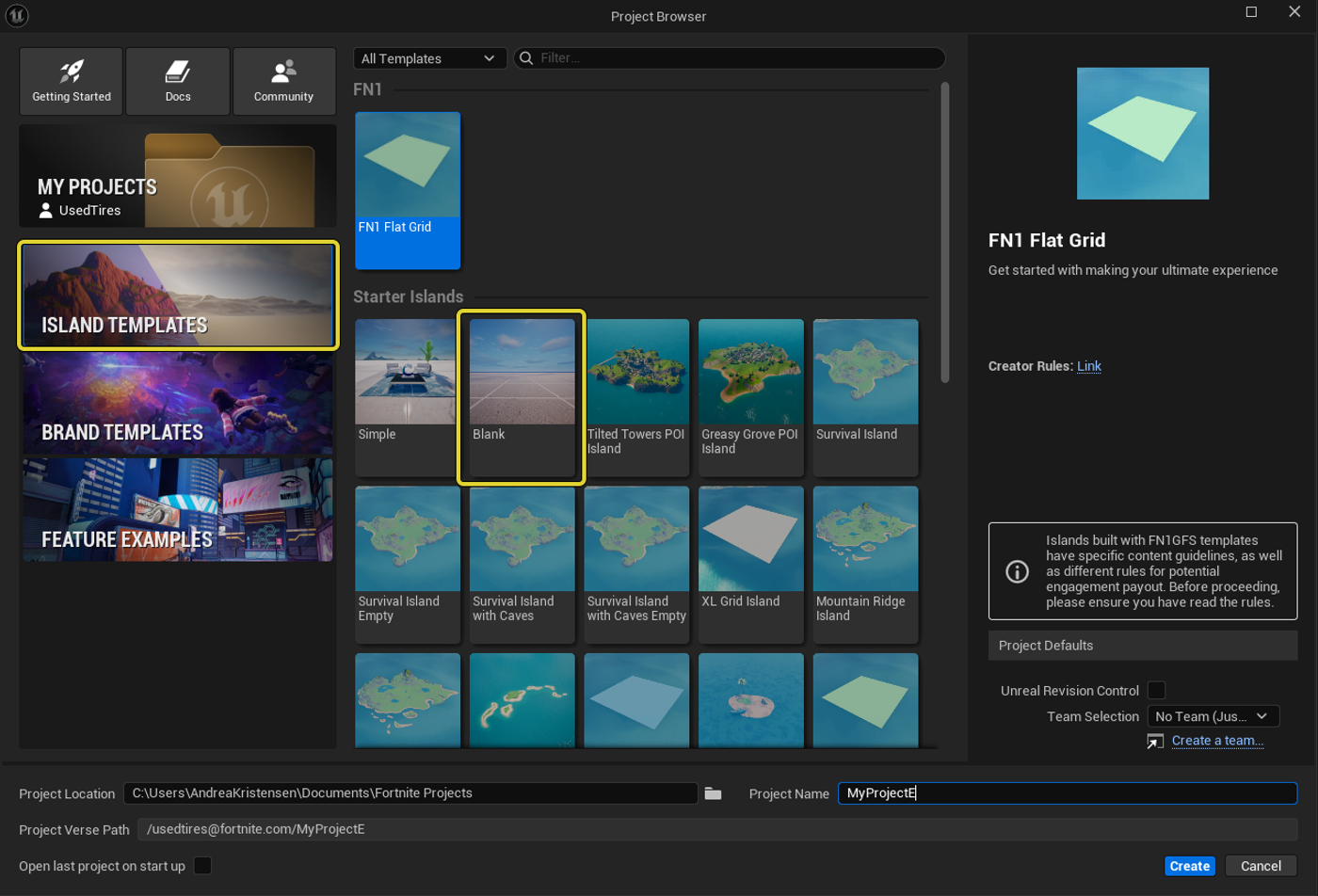
  3. At the bottom of the window, you can name and save your project. The name defaults to MyProject, but you can name it whatever you want.

    Three things to know about naming projects:

    1. Whatever you name your project will be that project's name moving forward for all of eternity.
    2. Only use letters, underscores ( _ ), and numbers to name it.
    3. Do not use spaces in the name.
  4. Name your project.

  5. Click Create.

You're reading a preview

The full reference is free for BrainDeadGuild Discord members — sign in to read it all, or open the original at the source.

Sign in with Discord — free for members Read the original at Epic Games

Sign in with your BrainDead.TV / BrainDeadGuild Discord account for full access.

Comments

    Sign in to vote, comment, or suggest an edit. Sign in
    📄
    Source
    Epic Games

    © Epic Games. Official Epic developer documentation, shown here as a reference with a link to the original. All rights remain with Epic Games. Terms ↗

    View original Sources & licensing
    Request removal
    Last updated Mar 29, 2026
    Keep exploring
    More in Materials/VFX · 18 of 211
    Prev
    environment light rig device in unreal editor for fortnite
    Next
    intro to postprocessing in unreal editor for fortnite
    Browse all files in this folder (A–Z)
    Next up
    • 2. Place and Customize a Device
    Related topics
    • Get Started Creating In Fortnite Tutorials
    • Build Your First Island In Fortnite Building & Props
    • Starting And Organizing A Project In Fortnite General
    • 35 00 Fortnite Ecosystem Updates And Release Notes Release Notes
    • Building Your First Island In Fortnite Creative Building & Props

    Related

    Open in graph →

    Related topics

    • Get Started Creating In Fortnite
    • Build Your First Island In Fortnite
    • Starting And Organizing A Project In Fortnite
    • 35 00 Fortnite Ecosystem Updates And Release Notes
    • Building Your First Island In Fortnite Creative
    VerseIsland · an archipelago of Verse & UEFN knowledge
    🗺️ Island atlas Learn Guides History About & Press Sources & Licensing Status

    Not affiliated with Epic Games. Fortnite, UEFN, Unreal Engine, and Verse are trademarks of Epic Games, Inc. Content is attributed to its source — see Sources & Licensing.

    🦜

    Scout · your island guide

    The Isle of Verse