VerseIsland
Feed Learn Leaderboard Guides Reference Explore Search Docs Verse Library
Sign in
Feed Learn 📖 Codex Leaderboard Guides Reference Explore Search Docs Verse Library
Fortnite Creative › Devices · Up to Fortnite Creative · Devices · 102 of 174 in Devices
Browse Fortnite Creative

Patchwork Distortion Effect Device

The Distortion Effect (FX-DIST) device can simulate the warm sound of a signal being overdriven through an analog tube amp, or an unsettling digital processing and warping.

Different styles of distortion shape the feel of audio in different ways, evoking various moods and music genres. In Patchwork, you can use distortion as a creative tool to customize your sound.

Device Options
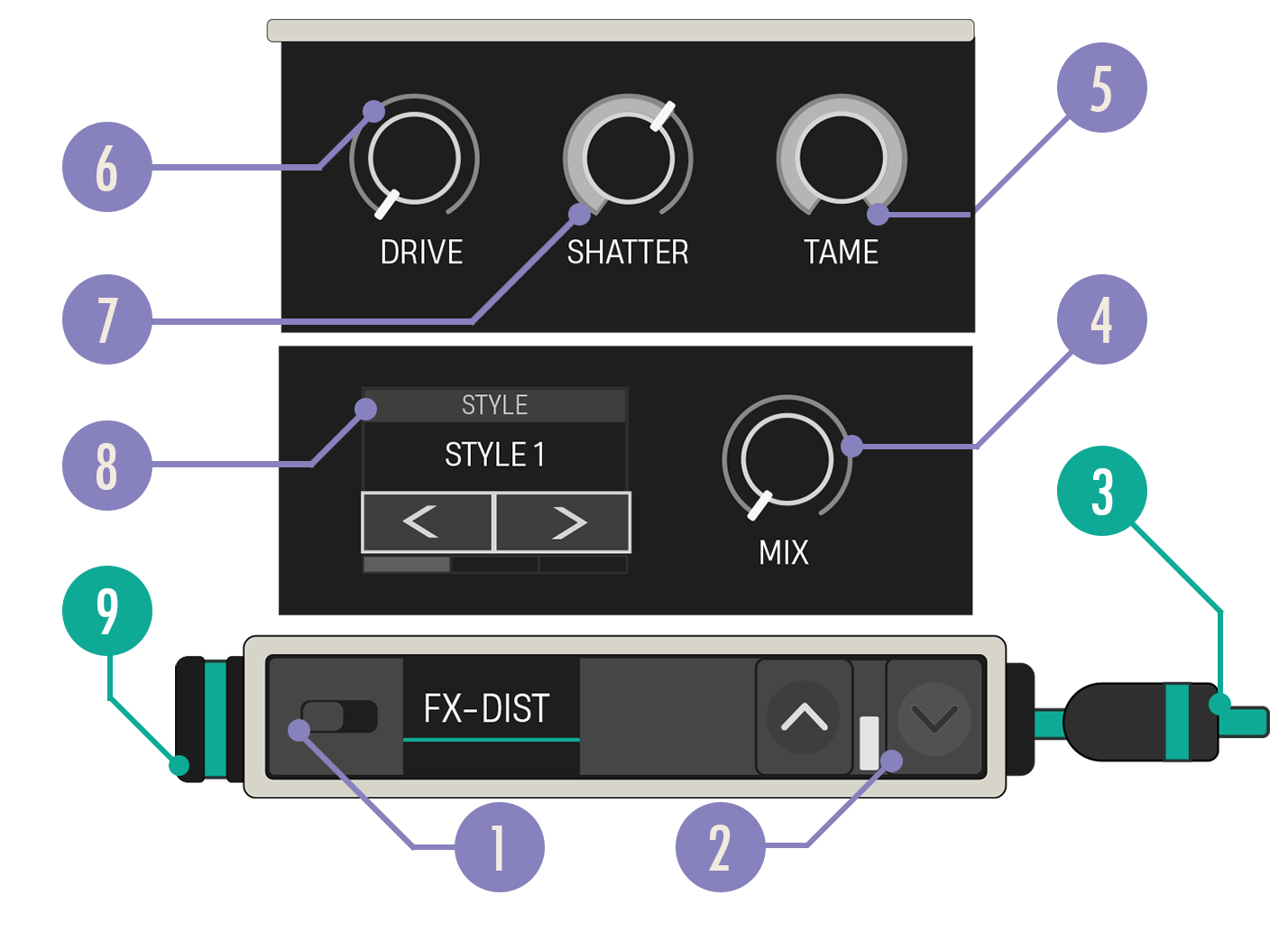
Distortion Effect device diagram

Option Values Description
1. Enabled Switch On, Off When disabled, the audio data is passed through without any effect applied.
2. Expand Buttons Closed, Open Expand the device to reveal more customization options.
3. Audio Out Cable N/A Connect the Audio Out cable to a teal Audio In port on another device.
4. Mix knob 1.0, 0.00-1.00 This determines how much of the audio output is processed by the effect.
5. Tame Knob 0, 0.00-1.00 Uses a low pass filter to reduce harsh high-frequency output caused by the distortion. Higher Tame values will filter out more frequencies.
6. Shatter Knob 0, 0.00-1.00 Controls how much of a DC offset is applied to the input signal. Increasing this causes the distortion to alter the signal in more destructive ways.
7. Drive Knob 4, 1.00-11.00 Sets the gain applied to the audio input. Higher Drive values will increase the distortion.
8. Style Carousel Clip, Warm, Asymmetric, Crunch Choose from the available Distortion styles.
9. Audio In Port N/A The Audio In port receives a teal Audio Out cable from another device.

You're reading a preview

The full reference is free for BrainDeadGuild Discord members — sign in to read it all, or open the original at the source.

Sign in with Discord — free for members Read the original at Epic Games

Sign in with your BrainDead.TV / BrainDeadGuild Discord account for full access.

Comments

    Sign in to vote, comment, or suggest an edit. Sign in
    📄
    Source
    Epic Games

    © Epic Games. Official Epic developer documentation, shown here as a reference with a link to the original. All rights remain with Epic Games. Terms ↗

    View original Sources & licensing
    Request removal
    Last updated Dec 7, 2024
    Keep exploring
    More in Devices · 102 of 174
    Prev
    using patchwork devices in fortnite creative
    Next
    using patchwork drum player devices in fortnite creative
    Browse all files in this folder (A–Z)
    Next up
    • The **Distortion Effect (FX-DIST)** device can simulate the warm sound of a signal being [overdriven
    • Patch Ideas
    • Patch Ideas
    • Ideas
    • Using Patchwork Speaker Devices In Fortnite Creative
    Related topics
    • Using Patchwork Distortion Effect Devices In Fortnite Creative Devices
    • Getting Started With Patchwork In Fortnite Creative Audio
    • Getting Started With Patchwork In Fortnite Creative Audio
    • Unreal Editor For Fortnite Glossary Verse Language
    • Fortnite Glossary Verse Language

    Related

    Open in graph →

    Related topics

    • Using Patchwork Distortion Effect Devices In Fortnite Creative
    • Getting Started With Patchwork In Fortnite Creative
    • Getting Started With Patchwork In Fortnite Creative
    • Unreal Editor For Fortnite Glossary
    • Fortnite Glossary
    VerseIsland · an archipelago of Verse & UEFN knowledge
    🗺️ Island atlas Learn Guides History About & Press Sources & Licensing Status

    Not affiliated with Epic Games. Fortnite, UEFN, Unreal Engine, and Verse are trademarks of Epic Games, Inc. Content is attributed to its source — see Sources & Licensing.

    🦜

    Scout · your island guide

    The Isle of Verse